




How To Rescue A Messy Product Photo Before You Reshoot It

You are ready to publish a listing today, and the best photo you have was taken on the kitchen counter. There is a coffee mug on the left, a tangle of charging cables on the right, and half a banana behind your product. The shot is sharp, and the lighting is good, but it is not something a buyer should see.
Reshooting everything on a white sweep is the safe answer, and it is also an hour or a weekend you may not have. The better question is how much of a messy photo you can save, and what to check before you trust the result.
Fix What You Can Control In The Shot
Most clutter problems are easier to prevent than to repair. Clear the frame of everything that is not being sold, even if you plan to cut it out later. Shoot against a plain surface, and use soft window light so your product casts gentle shadows rather than harsh ones. Photograph at the highest resolution your camera or phone allows, because you will usually crop in afterward, and a tight crop on a low-resolution file looks soft.
Contrast helps too. A white product on a white tablecloth leaves any editing tool, human or automatic, with very little to separate. A darker, plain backdrop gives you cleaner edges to work with, even if the final listing image ends up on white.
Know What The Marketplace Expects
Before you choose how to edit, check where the image is going. Amazon’s guidance for main images, as posted by its seller support team, asks for a well-lit, in-focus photo on a pure white background (RGB 255, 255, 255), with the product filling at least 85% of the frame and no added text, graphics, or watermarks.
Seller guides also commonly recommend at least 1,000 pixels on the longest side so zoom works, and 1,600 pixels or more where possible. Those figures are why a messy original matters. An off-white or gray background, or a product that fills only a small part of a large canvas, can mean the image gets flagged or simply looks smaller than a competitor’s in search results.
Clean Up The Background, Then Inspect It
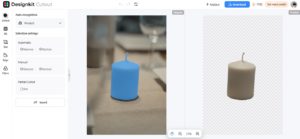
Once the photo is as good as you can make it, you have two broad options. Manual masking with a lasso or pen tool gives you full control, but it is slow, and it does not scale when you have dozens of products. An AI background remover from Designkit can handle most cluttered scenes in seconds, which makes it practical for a whole catalog.
Automatic cutouts are not equally reliable on every subject. Four situations deserve a closer look:
- Glass and glossy packaging: Reflections and transparency can confuse the edge, leaving halos or removing parts of the bottle.
- Similar colors: A cream candle on an off-white cloth gives the tool little to separate.
- Thin details: Laces, straps, and small gaps can be clipped or filled in.
- Hands and skin: Fingers holding a product can lose edge detail or pick up leftover background.
Zoom to 200% and check the edges on both a dark and a light background. White outlines and rough patches often hide on a white canvas, then show up as soon as someone changes the backdrop.
Check Edges And Dimensions Before You Upload
Finish with a short pass before anything goes live. Confirm the background is truly pure white if the marketplace requires it, because a near-white fill is one of the easiest mistakes to miss. Make sure the product fills the frame, that nothing is cut off, and that the resolution is high enough to zoom. Keep a copy of the original and the edited version side by side, so you can compare them if a result looks off.
A messy photo is rarely a dead end. With a few shooting habits, a clear picture of what the platform needs, and a careful look at the edges, most of them can become listing-ready without a reshoot.