




Best AI PDF-to-Podcast Tools in 2026

The best AI PDF-to-podcast tools can turn documents, research papers, reports, and other written content into audio, making information easier to consume while saving time.
Whether you’re a business professional looking to streamline document workflows, an educator trying to make materials more accessible to your students, or a content creator repurposing material into podcasts, there’s a tool to suit your needs.
Listening to documents instead of reading them can be useful when you’re multitasking, commuting, or dealing with large amounts of information.
Options such as Adobe Acrobat, Gemini Notebook, Jellypod, Scholarly, 1Bit AI, and ElevenLabs offer different approaches, and you don’t want to waste time just trying to identify the best tool for you.
In this guide, I compiled their main features, ease of use, customization options, pricing, and the types of users they’re best suited for. This way, you can easily get an overview and choose which one you’d actually like to try.
[separator type=”thin”]
What Is an AI PDF-to-Podcast Generator?
A PDF-to-podcast generator is an AI-powered tool that can transform a PDF document into audio you can listen to as if it were a podcast episode.
It’s important to differentiate these podcast generators from text-to-speech tools. Although these terms are sometimes used interchangeably, they describe two different approaches to converting documents into audio.
A text-to-speech tool, also known as PDF-to-audio, reads the document aloud using synthetic voices following the original text.
Instead, a PDF-to-podcast interprets the document and transforms the content into a podcast-style discussion. This may be as a conversation between two characters or even a single host. In any case, it will summarize the document’s content, explain complex concepts, and make it more enjoyable.
However, not all PDF-to-podcast generators offer the same capabilities. Some are designed for quick summaries; others can handle in-depth analysis combining multiple documents.
Some may let you choose the number of hosts or customize the voices, while others are more limited.
When choosing a tool, look beyond audio quality and consider features, limitations, and, of course, price. Here’s a guide to help you with that.
[separator type=”thin”]
Best AI PDF-to-Podcast Tools in 2026
If you’re tired of browsing through endless websites to compare features, prices, and capabilities, or creating accounts just to see what a tool can do, I’ve compiled everything you need to know in one place to help you find the best AI PDF-to-podcast tool for your needs.
Best AI PDF-to-Podcast Tools: At a Glance
| Tool | Best for | Standout features | Starting price |
|---|---|---|---|
| Adobe Acrobat | Business professionals and teams | Multi-document podcasts, Highlights and Deep Dive formats, collaborative PDF workflows | US$24.99/mo |
| Gemini Notebook | Research and information synthesis | Five podcast formats, multilingual sources, customizable focus | Free; paid from US$4.99/mo |
| Jellypod | Podcast creators | Custom hosts, script editing, direct publishing | Free trial; paid from US$25/mo |
| Scholarly | Students and educators | Exam preparation, study-focused formats, flashcards | Free; paid from US$15/mo |
| ElevenLabs | Professional audio production | Realistic AI voices, customizable speakers, commercial licensing | US$6/mo |
| 1Bit AI | Flexible content repurposing | Editable scripts, Canva integration, downloadable MP3s | Credits from US$5.99; plans from US$4/mo |
Pricing as of November 2026. Monthly subscription prices reflect annual billing where applicable.
Adobe Acrobat
Tested with Adobe Acrobat online in November, 2026; Google Chrome on macOS Tahoe 26.3.1.
Adobe Acrobat lets you turn an individual document or an entire PDF Space containing multiple documents into a podcast using its Generate Podcast feature.
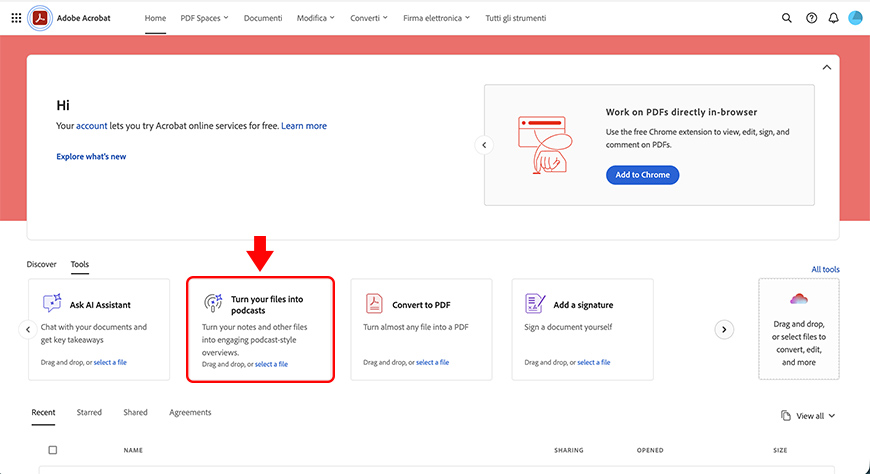
PDF Spaces support up to 100 documents, which you can then use to create an audio summary. All documents must be in the same language, though. While Adobe Acrobat supports different languages, it doesn’t offer a cross-language output.
Turning documents into a podcast can be particularly helpful for business professionals who need to review multiple reports, proposals, or business documents without reading through each one.
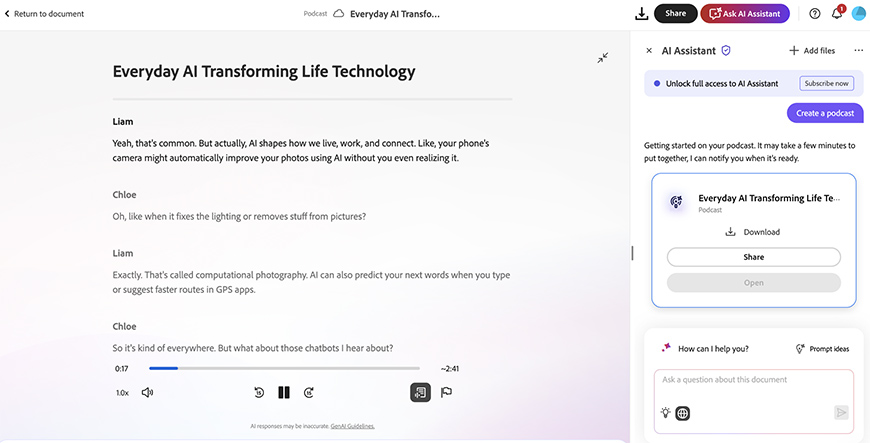
Adobe Acrobat generates two audio formats: Highlights and Deep Dive. Highlights provides a shorter overview of the material, while Deep Dive offers a more detailed exploration. They’re both generated simultaneously, so you don’t need to create additional generations if you want to start with the short version and listen to a deeper analysis later.
When listening, you can use the customization controls like playback speed or the skip buttons. You can also follow along with the transcript as you listen. This makes it easier to review important information or refer back to specific points.
You can always hide both the transcript and the control bar if you prefer a cleaner interface.
Once you’ve created your audio, you can easily share it by entering the recipient’s email address. You can also choose whether that person can provide feedback or contribute to your podcast, making it easier to collaborate with colleagues and teams.
Another convenient feature is that you can listen on either your computer or mobile device, making it easy to access your audio content wherever you are.
Beyond generating podcasts, Acrobat also offers features such as PDF editing, document conversion, AI-powered summarisation, and presentation generation. This allows you to manage several document-related tasks within the same workflow.
Privacy is another important consideration, especially if you work with confidential documents, client information, or internal business files.
Adobe provides privacy and security protection for Acrobat Studio and its AI features, including assurances that customer content isn’t used to train generative AI models.
This can be an important consideration when uploading sensitive files into an AI-powered PDF-to-podcast tool.
While Adobe Acrobat has a free version and some of its AI tools are free to use, such as the AI summarizer or the AI Resume Builder, the PDF-to-Podcast feature is only available to Acrobat Studio subscribers. This is Adobe Acrobat’s highest membership tier.
The cost as of writing in November 2026 is US$24.99 per month with an annual plan, and US$34.99 per month with a monthly plan. There is a 7-day free trial and a 14-day money-back guarantee.
That said, your free Adobe account allows you to try some premium features. So, you can try Adobe Acrobat’s PDF-to-Podcast before subscribing. The complimentary MP3 file is downloadable, or you can share it and listen online, as you would with a paid plan.
Best for business professionals and teams looking to streamline document workflows. Adobe Acrobat is particularly useful if you regularly work with PDFs and want to combine audio summaries with other features such as PDF editing, document summarisation, and presentation generation. Adobe’s privacy protections also make it the most convenient option for collaborative business workflows.
Gemini Notebook
Tested November, 2026; Google Chrome on macOS Tahoe 26.3.1.
Gemini Notebook used to be called NotebookLM. You can access it with your regular Google account, and it’s free to use with certain limitations.
Using a free plan, you’ll get 100 notebooks that support 50 sources each. Some advanced sharing features are reserved for paid users, and generated features may have usage quotas.
If the free version is too limited, there are four pricing tiers ranging from US$4.99 up to US$199.99. Subscriptions apply to all paid Google services. In other words, you pay not just to increase the Notebook limits, but to use Google Flow, Gemini, Google Studio, and others.
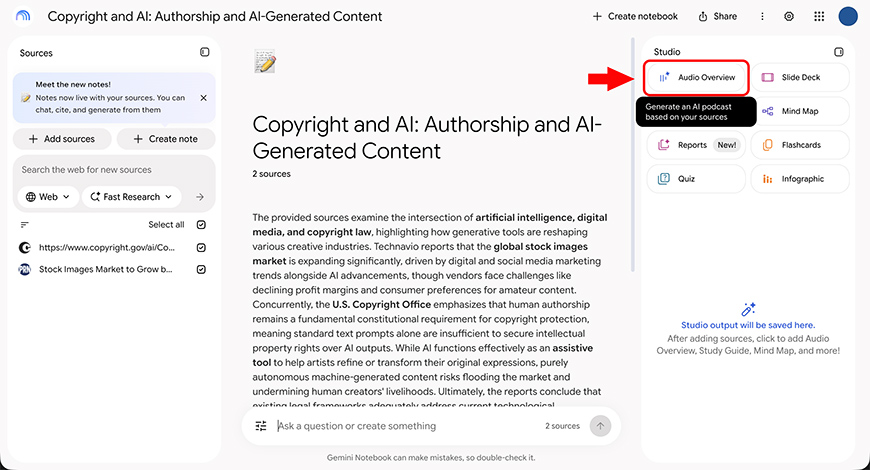
To generate a podcast, click Audio Overview. Once you do, a pop-up window opens with all the options you have to customize the podcast.
First, you can choose the format from five different options. Deep Dive features two hosts exploring and connecting ideas across your sources, which is the most standard format. However, you can also request a Debate if you prefer the hosts to discuss and present different perspectives, or a Talk Show for a more informal conversation.
A Brief is a bite-sized overview that extracts the main concepts, while a Critique is an expert-style review with constructive feedback.
The different formats allow you to use Notebook in several professional situations. If you’re preparing for a presentation for your boss or putting together a client brief, a Brief can help you to quickly identify important information.
Instead, a Deep Dive can be useful when researching a new market, while a Debate can help explore different perspectives before making a business decision.
It’s also useful for professionals studying for a new certification or learning about an unfamiliar topic.
While the format affects the length, you can also manually choose short, default, or long depending on how much time you have to listen to the podcast.
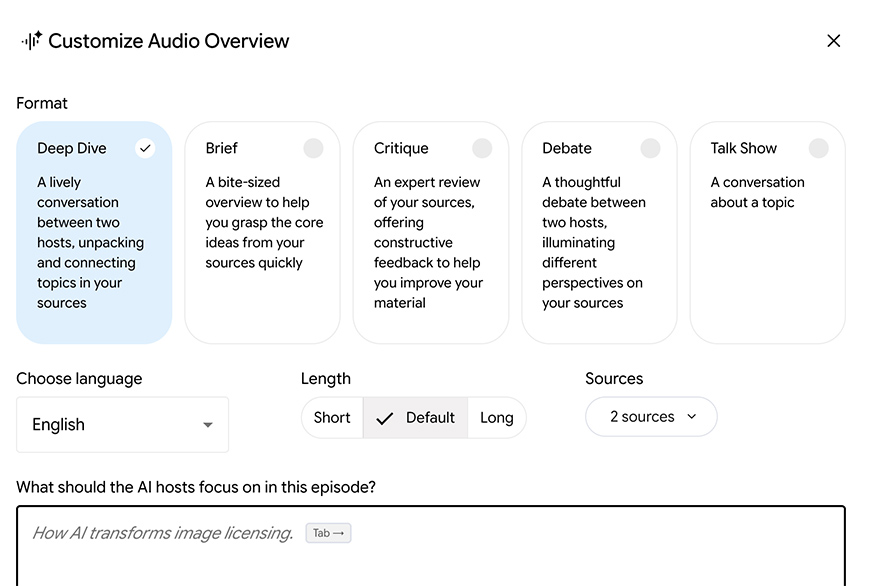
You can also select the output language. This is particularly useful if you’re working with multilingual research materials.
While you can upload up to 50 sources on a free plan (and up to 600 in the highest tier), you don’t have to use them all for your podcast. Simply tick the checkboxes next to the sources you want Gemini to use when generating the podcast.
Lastly, you can use the dedicated text field to specify which topics the hosts should focus on. You’ll have AI-generated suggestions based on the content of the document to help you in case you’re unsure. You can also leave this space blank.
You can then download your podcast to listen offline or share it as an audio file. You can also share the podcast or the entire notebook via a link.
Best for students, researchers, and business professionals who regularly work with large amounts of information. It has a fully functional free tier that allows interactive Q&A. Among the different podcast formats, you’ll find Debate and Critique, and it supports multi-language sources.
Jellypod
Tested November, 2026; Google Chrome on macOS Tahoe 26.3.1.
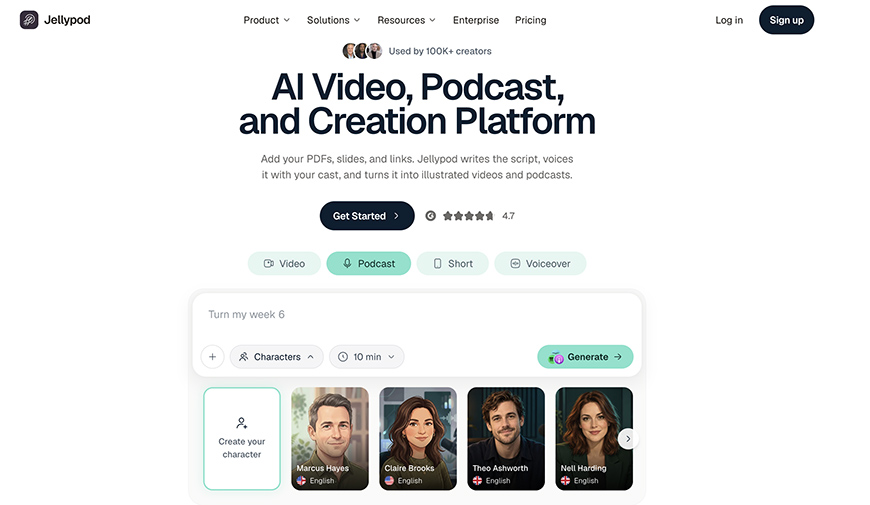
Jellypod is an AI-powered creation platform specialized in video and podcast generation.
It offers more options than the previous platforms without losing its intuitive and easy-to-use nature.
You can click on the Podcast option on the home generation page, or go to the PDF-to-Podcast option. Both options offer the same customization settings.
You can add up to four characters, which you can select or customize. Jellypod has a 3,300 AI voice library across 121 languages, and you can even create your own voice clone.
The length is expressed in minutes – with the free trials, you can generate a podcast that’s a maximum of 15 minutes long.
Jellypod supports PDFs of up to 250 pages and can combine multiple sources. You can also upload the script directly.
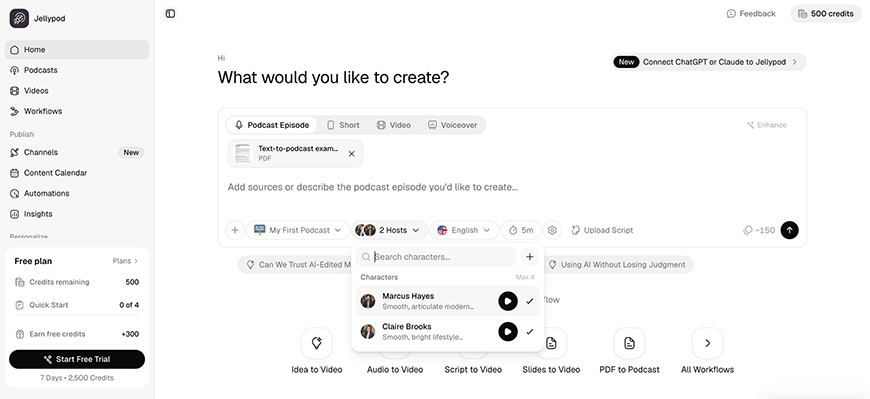
You can review and edit the generated script before generating the final audio, and you can also specify the topics you want the hosts to focus on.
Then, you can edit line by line after it’s generated and regenerate only specific segments.
Advanced features include auto-publishing directly to platforms such as Spotify, Apple Podcasts, and YouTube. You can also connect Jellypod to ChatGPT or Claude.
You can try Jellypod with the 500 free credits included with your subscription, which cover up to five 3-minute podcasts or one 15-minute podcast. You can earn more free credits by following them on social media.
Once you’re convinced, you can top up by purchasing credits starting at $20. Otherwise, you can get a subscription that ranges from $25 to $125 per month for annual plans. Monthly plans are also available, but they cost more.
Best for creators and podcasters as it’s an end-to-end podcast hosting platform. It allows direct publishing, lets you create series and plan publishing with an episode calendar, and supports brand kits, insights, and other professional features.
Scholarly
Tested November, 2026; Google Chrome on macOS Tahoe 26.3.1.
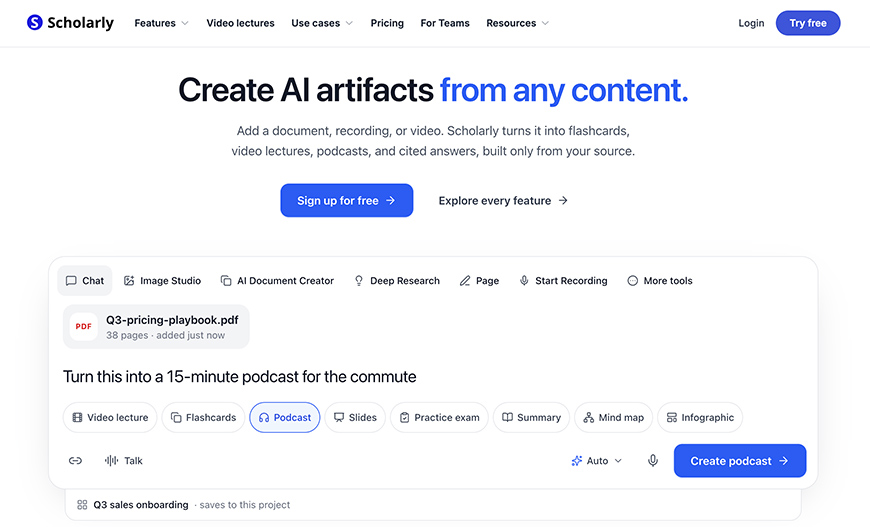
Scholarly is an AI-powered learning platform that allows you to turn PDFs and other study materials into conversational podcasts.
You can generate podcasts for business and other purposes. However, Scholarly is designed around learning and knowledge retention. In fact, it even offers different student profiles to choose from so it can generate the most fitting material.
Once you upload your sources, which can be PDFs, videos and any other media, you can generate your podcast after customizing the options.
There are three available formats: Conversational, Exam Prep, and Deep Dive. You can optionally add another level of customization by choosing a long-form interview, a Socratic study group, late-night banter, or a crash course.
You can then choose the cast for the three characters from a vast library of voices. Set the language, the length (2 to 60 minutes), and the AI model. You can even generate a slide per chapter as a visual aid.
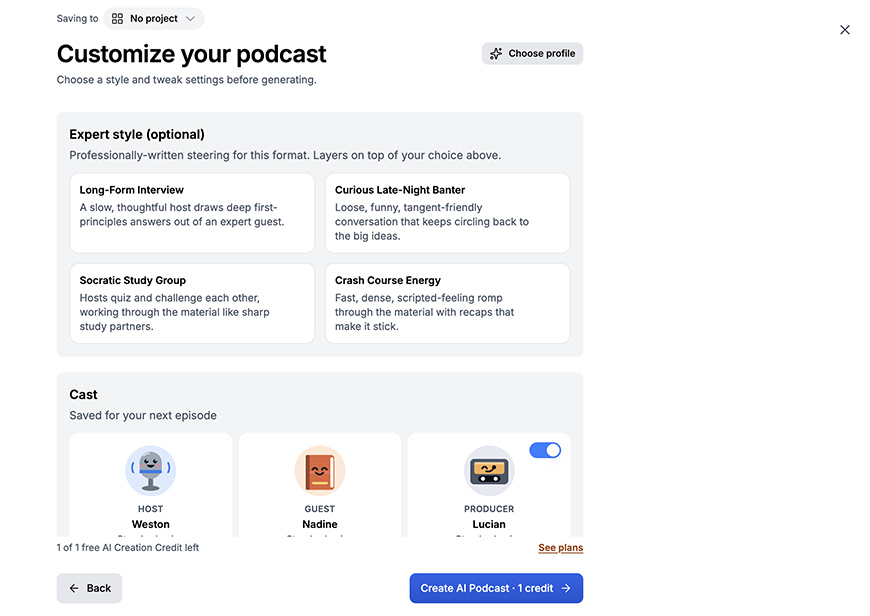
Lastly, enter your instructions in a text prompt and generate your podcast. You can listen to the podcast on the platform or access it via a shared link. To download it, you need a paid subscription.
There are other limitations to the free plan, such as length, AI model, and the fact that it only supports one source.
To upgrade, you can get a Premium plan starting at US$15 per month on an annual plan or the Laureate one for US$99. In addition to increasing the credits allowance, you also upgrade the number of sources, as they support 10 and 20, respectively.
Best for video lectures and studying. The options to customize your podcast are all scholarly-oriented. Plus, you can interact with the sources in more ways, such as flashcards to improve knowledge retention.
ElevenLabs
Tested November, 2026; Google Chrome on macOS Tahoe 26.3.1.
ElevenLabs allows you to turn PDF documents and other source materials into an AI-generated podcast.
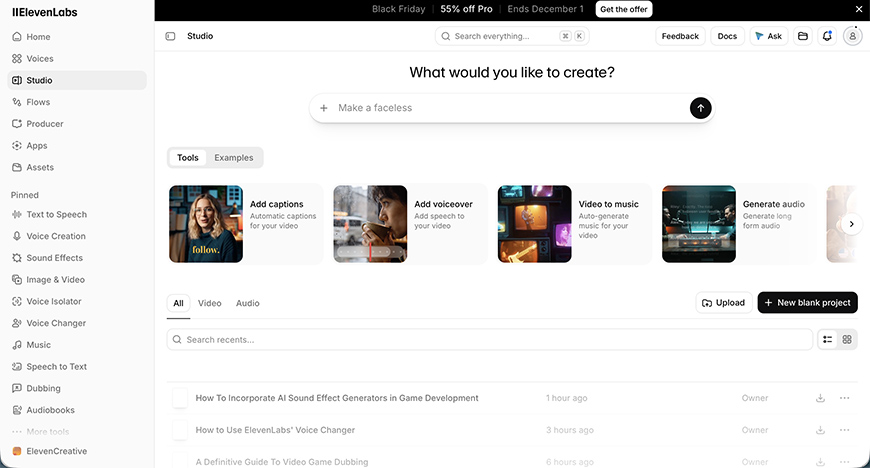
Unlike the previous generators on this list, which offer a relatively straightforward way to find and generate a podcast, ElevenLabs offers a much broader, more complex audio-production environment.
You’ll find text-to-speech, dubbing, audiobooks, voice cloning, and other audio-generation tasks.
This offers more creative possibilities, but it also makes the interface less intuitive if you simply want to turn your PDF into a podcast.
This complexity also applies when comparing subscription plans. ElevenLabs offers different tiers with various capabilities on each. In the comparison table, it’s not easy to understand which tier includes text-to-podcast.
You may, therefore, assume the free plan includes it, only to discover that it requires a paid subscription.
On the positive side, you can choose between Conversation and Bulletin formats, with three length options each.
You can also choose the voice of the host, and also the guest if you choose the Conversation option.
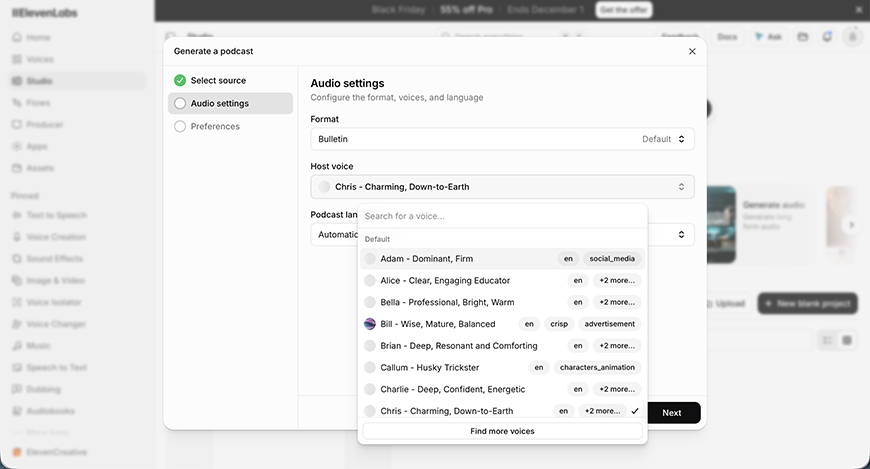
It supports multiple file types, not just PDFs. This can be ebooks, HTML files, importing a URL, etc. It also supports multiple languages, and you can use a text prompt to choose the podcast’s focus.
Prices range from US$6 for the Starter pack to US$990 for the Business plan when billed annually; monthly subscriptions are more expensive. The PDF-to-podcast is available from the Starter plan, which gives you 30K credits.
The number of credits a podcast generation consumes depends on the AI model and the number of characters.
You can download the podcast, and it has a commercial use license.
Best for creators, podcasters, and commercial publishing. It offers best-in-class voice realism, a large voice library, pre-generation script and speaker editing, and commercial rights.
1Bit AI
Tested November, 2026; Google Chrome on macOS Tahoe 26.3.1.
1Bit AI is a creation platform with an Audio Overview feature that allows you to turn documents, articles, website links, or even a topic idea into a podcast.
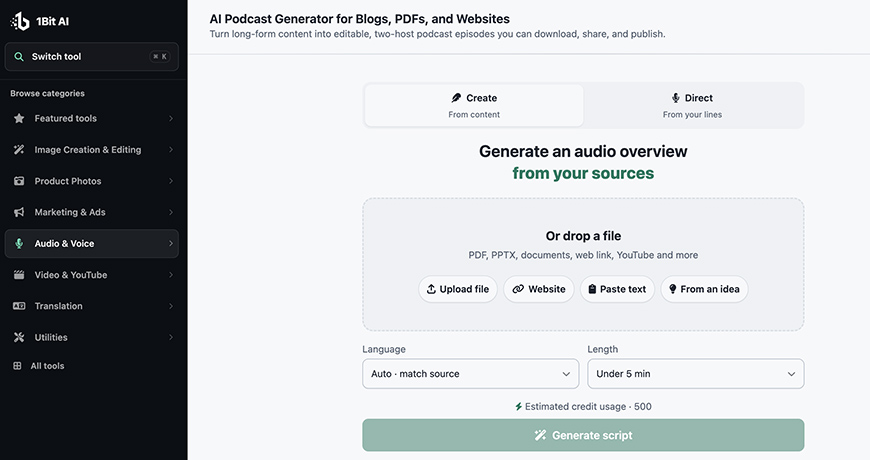
It creates a two-host conversation to make the audio more engaging and can be particularly helpful for students, researchers, or anyone who wants to make written material easier to consume.
This is also because it offers Chrome extensions that make it easier to access certain AI workflows while browsing.
Content Creators can also benefit from 1Bit’s AI Podcast Generator app on Canva. This lets them create podcast-style conversations inside their projects and easily integrate them. This feature is also useful for educators who want to combine audio with presentations and visual materials.
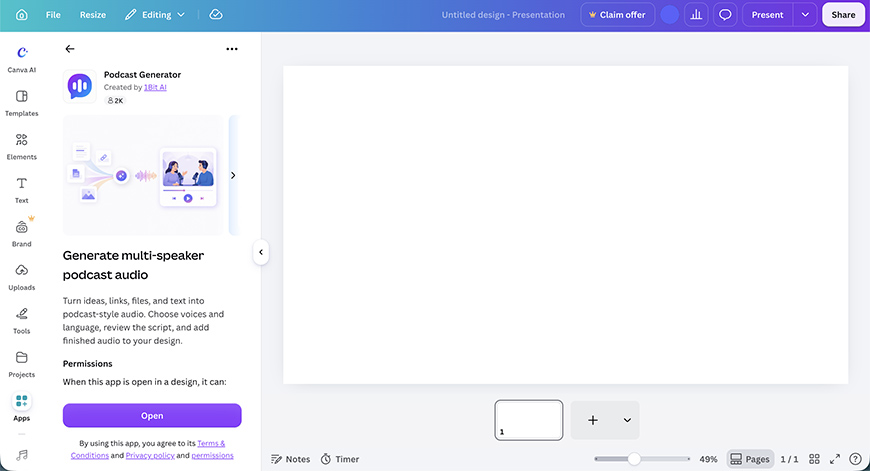
Back in the native 1Bit AI platform, you can create a script, preview it, and edit it for free before generating the audio. This is a convenient feature that helps you save credits.
On the script preview, you can correct information, adjust wording, or customize the conversation. For tone, you can choose from five delivery styles: conversational, energetic, calm, professional, and storytelling. The target length is adjustable from 5 to 30 minutes.
Once you’re happy with the script, choose the voices for each host and generate the audio. Another handy feature is that you can generate matching notes to accompany the podcast. The finished audio is downloadable as an MP3 file.
Beyond podcast generation, the platform offers several other AI-powered tools for content creation. Other audio-related features include text-to-speech and video translation, as well as an image generator and other visual tools.
So, 1Bit AI is a versatile option if you’re looking to combine different creative tasks within one ecosystem.
You get started with 100 free credits, but the starting cost for a PDF-to-podcast generation is 500; the final cost is displayed before generation, so you can check how much a task will cost in advance. The free way to try this tool is to generate the script, which doesn’t require credits.
You can purchase credits without a subscription and use them as you go – they don’t have an expiration date. The starting price is US$5.99 for 1,000 credits.
Otherwise, you can get a monthly or an annual subscription. Either way, there are three tiers: Lite, Pro, and Ultra. Prices range from US$4 to US$32 per month on the annual plan and US$9.99 to US$39.99 per month on the monthly plan.
Best for students, researchers, and anyone who wants to turn written content into audio, either on the main platform or via the Chrome extension. The Canva integration is particularly useful for content creators and educators who want to combine audio with visuals.
[separator type=”thin”]
Which AI PDF-to-Podcast Tool Is Best?
Adobe Acrobat is my top recommendation for business professionals who regularly work with PDFs. Its ability to generate podcasts from multiple documents within PDF Spaces, combined with its broader document management and collaboration features, makes it particularly useful in professional settings.
If you’re looking for a free PDF-to-podcast generator, Gemini Notebook is an excellent starting point, especially for research and learning. Scholarly is better suited to structured study and exam preparation.
For creators producing podcasts for publication, Jellypod offers a comprehensive production and publishing workflow, while ElevenLabs stands out for voice quality and 1Bit AI offers a flexible alternative for occasional use.
Disclosure: This article contains affiliate links. We may earn a commission at no cost to you; our testing is independent.