




Best AI Video Generators in 2026: Features, Pricing and Commercial Use

Are you looking for the best AI video generator in 2026?
Choosing the right platform isn’t easy. Credit systems, features, and pricing models vary so much that choosing the right one can be time-consuming and costly.
Finding reliable information can be just as confusing when you’re getting started. Many comparisons focus on AI models rather than platforms you can actually subscribe to. This complicates things further.
That’s why I structured my article around end-user platforms, covering their native AI models and whether they support third-party ones.
To do so, I compared the leading AI video generators across three key areas: features, pricing, and commercial use policies. My goal is to help you find the platform that best fits your workflow and creative needs.
So, let’s get started.
Adobe Firefly
You can use Adobe Firefly in a browser, for free on the mobile app, and integrated into other Adobe products such as Adobe Premiere. I’m just focusing on Firefly as a standalone product to make the comparison easier.
You can generate videos for free with Adobe Firefly. You’ll have a daily limit, and not all models or features are available, but it’s a great option if you don’t have a budget.
Features
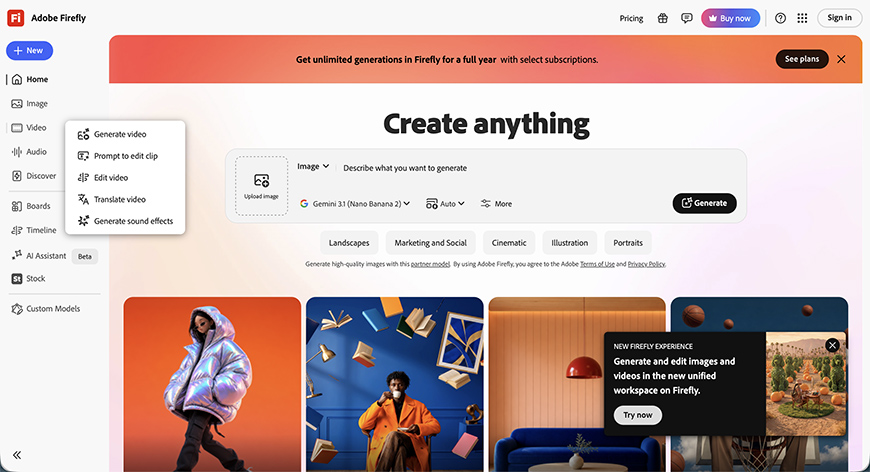
You have 17 AI models to choose from, including some popular ones that will be included in this list as well.
You can also find many popular AI models developed by Google, Runway, and other companies in Firefly. However, you can’t find the Firefly model anywhere else aside from the Adobe ecosystem
Focusing on Firefly, it offers a maximum resolution of 1080p, a 5-second duration at 24 FPS, and three different aspect ratios. You can upload the first and last frame, as well as reference videos for composition and motion separately.
You can select the motion from the available menu if you prefer. You can also select the shot size, camera angle, and style from the menus.
Among the advanced features, you can generate a video with a transparent background and provide a Seed.
Each partner model has different options. Some let you generate videos at 4K; others offer more aspect ratios to choose from, etc. There’s a huge array of possibilities to fit every creator’s needs.
Other video features available on Adobe Firefly include prompt-to-edit, edit video, translate video, and generate sound effects.
Pricing
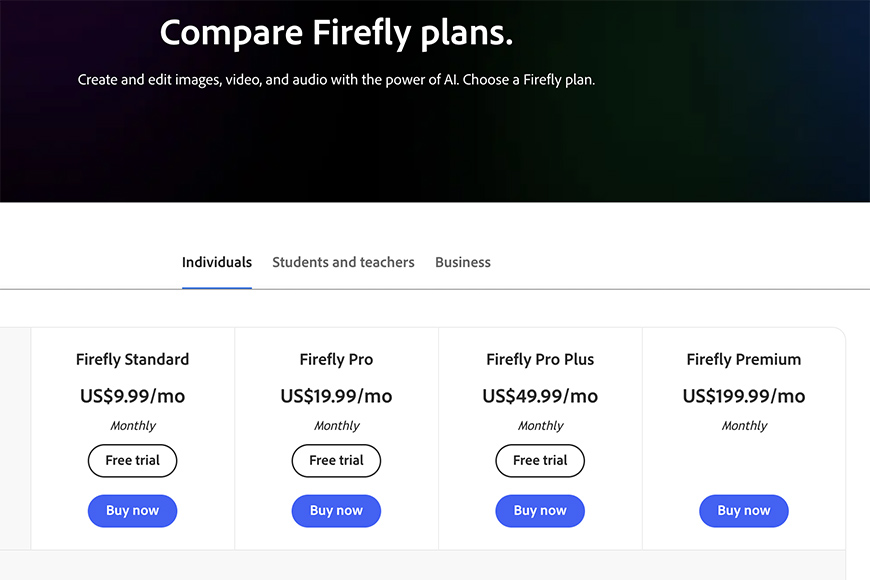
If the free version of Adobe Firefly isn’t enough, you can subscribe. There are four tiers, from 2,000 to 50,000 credits, starting at US$9.99 per month. Beyond the number of credits, you’ll also get different perks depending on the plan.
From the 2nd tier onwards, a Firefly membership also gives you access to other Adobe apps such as Adobe Express Premium and Adobe Photoshop on web and mobile.
This may include how many sound effects you can generate or how long the video can be if you’re generating its translation. The Creative Cloud Pro includes all Adobe apps, including Firefly.
Other Adobe memberships may also give you credits to generate content in Firefly, for example, a Photography plan (1TB) gives you 1,000 generative credits. You can also buy extra credits with these types of membership.
Commercial Use
Videos generated in Firefly are yours to use as you see fit, including commercial purposes.
However, only the videos generated with the Firefly model are commercially safe and trained on licensed and public domain content. This means Adobe offers commercial-use assurance and transparency training. Adobe designed this to mitigate the risk of copyright issues.
Adobe also offers IP indemnification. This means that it will cover legal costs and damages if you face any issues by using Firefly-generated content.
It’s important to understand that generating a model inside the Firefly platform is not the same as generating a video using Firefly technology.
Since partner models weren’t developed by Adobe, you can use them commercially but without the same assurances as you have when using the Firefly native model.
LTX Studio
LTX Studio is a platform dedicated to professional video generation. It’s designed to help creators through the entire process, from scripting and storyboarding to generation and editing.
However, LTX aims to meet creators at all levels, and you can try the basic features for free with the 800 credits offered when you set up a free account.
Features
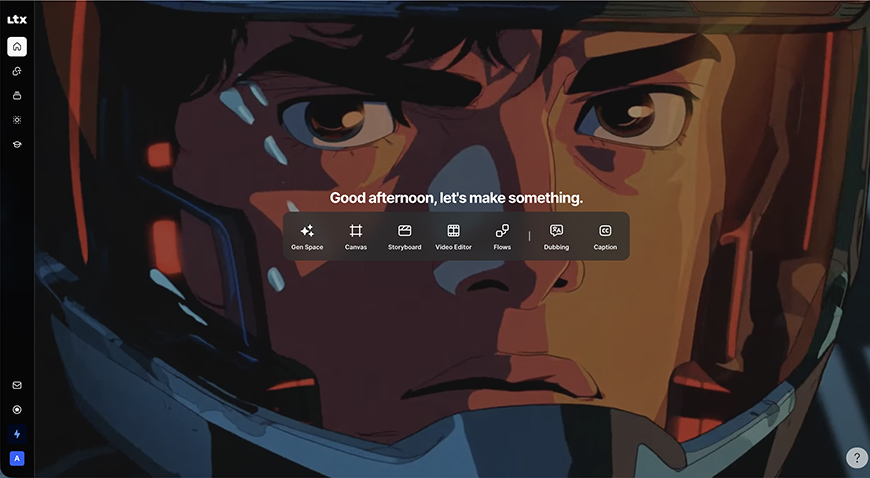
LTX features include text-to-video, image-to-video, script-to-video, AI video-to-video, audio-to-video generation, and an AI storyboard generator. Other video features include captions, dubbing, and video editing.
The LTX’s most recent model is LTX 2.5. It allows you to upload a first and last frame. You can’t add a motion reference, but the menu offers many options to choose from.
The video duration is up to 20 seconds and up to 4k resolution. You can get up to four videos per generation; you can adjust this setting, as more videos cost more credits.
You can choose from three aspect ratios: landscape, portrait, or square. Plus, you can choose between 24, 25, 48 or 50 fps.
There are twelve different AI models, four of which are native to LTX. I really appreciated the tag warning for long time or high cost next to each partner model.
Pricing
The 800 credits you get to start are a one-time offer. So, once you finish them or whenever you want to try out more advanced features, you can get a monthly or annual subscription.
There are three subscription tiers, starting at US$12 (8,000 credits) and going up to US$100 (110,000 credits) per month on the annual plan. Only the two more expensive memberships offer credit top-ups.
Another important point is that each level unlocks more AI models. For example, the Veo 3.1 models are only available on the top tier. The native LTX model is available on all plans in its latest version, currently 2.5.
Commercial Use
Commercial use is only allowed with a Standard or Pro membership, the two more expensive tiers.
As far as I could research, LTX is not facing any copyright lawsuits. However, it does operate under a ‘use at your own risk’ policy.
Runway
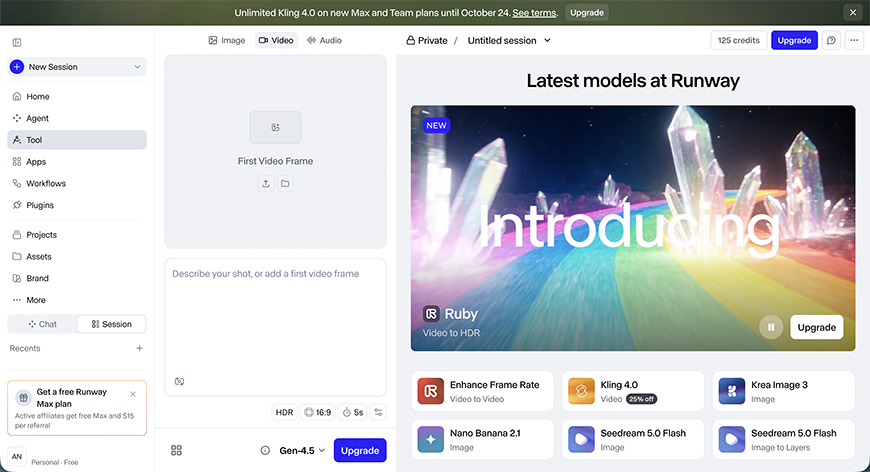
Runway is available on the web and as a mobile app. There’s a free tier with 125 credits to try Runway’s capabilities. Not all models and features are available unless you upgrade.
Features
Runway offers around 50 different AI models for video generation. Some of them are native, while others come from third-party developers.
Gen 4.5 is Runway’s latest model for image or text-to-video generation. Runway also offers many other native models for video editing, frame rate conversion, etc.
As you change the AI model, you’ll change the parameters you can control, and each one costs a different number of credits and has a different monthly usage limit.
Runway’s Gen 4.5 lets you upload an image as the first frame and generate up to ten-second videos in a 16:9 aspect ratio. You can use a fixed seed.
As you can see, the native model is quite limited, but there are plenty of others to choose from to fit your needs.
Pricing
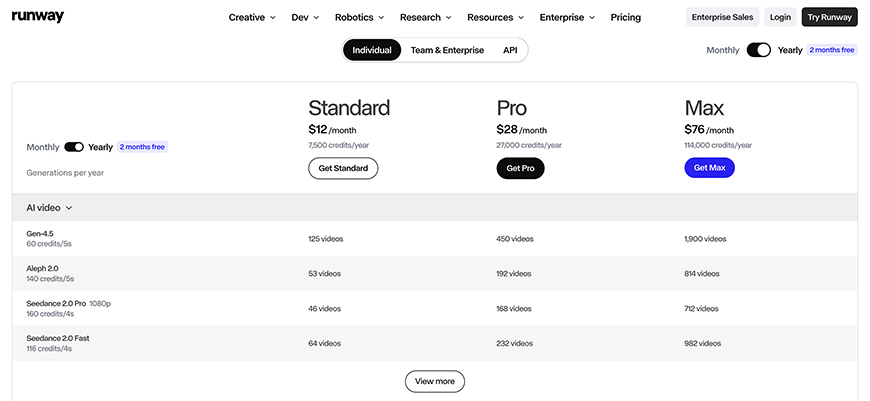
The credits awarded to you when you create your account are not renewable. So, once you finish your 125 credits or you want to use more advanced models and features, you need to subscribe.
Three tiers are available, starting at US$12 and going up to US$76 per month on annual memberships. You can subscribe monthly, but the cost increases.
The credits range from 625 up to 9500, and other features also increase with the pricing tiers. This depends on the number of projects, parallel generations, storage capacity, and more. One key difference is that HD videos are only available on the top tier.
All three tiers give you access to the available AI models, but only the last one gives you early access. Another perk about the top tier is that credits roll over one month.
Commercial Use
Runway grants commercial rights to their use, so you can monetize them through YouTube or use them as advertising for your brand.
However, there are no assurances against copyright infringement. In fact, Runway is facing multiple copyright and intellectual property lawsuits, according to Reuters, Bloomberg, and other news channels.
Google Flow
Google Veo 3.1 was released in April 2026, and it’s the most current model today. It comes in three versions: 3.1 (Quality), 3.1 Fast, and 3.1 Lite.
Google doesn’t offer a stand-alone video generator or a Google Veo app. So, you need to access it through one of Google’s services.
Some options include Gemini and Google AI Studio. Third-party platforms also offer it as a partner model. I’ll focus on Google Flow because Google created it specifically for video editing.
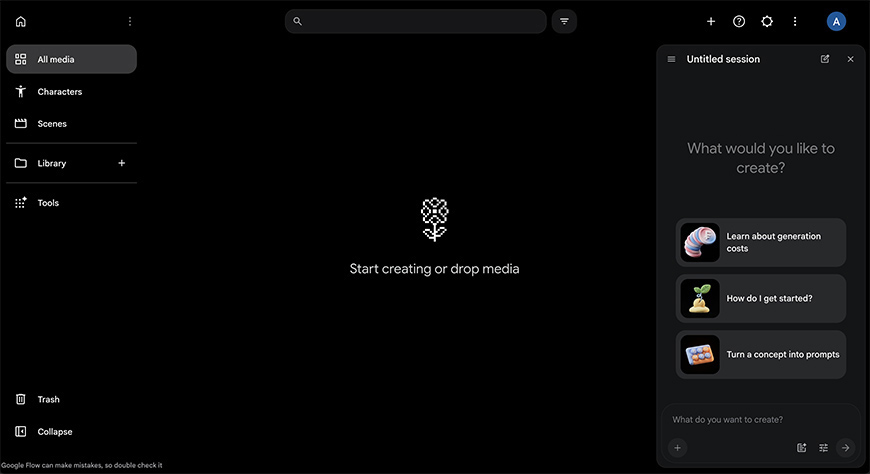
You can sign in with your Google account; there’s no need to create a new one. You’ll have 50 free daily credits to try the service.
Features
Google Flow has a handy AI chatbox that guides you through video generation. Interacting with the bot doesn’t consume any credits.
It helps you refine your prompt by asking questions about the mood, the characters, and more. Then it breaks down the script scene by scene.
Another Google Flow feature lets you generate a visual storyboard before creating the video. You can use this to give feedback on each frame. This way, the video will look as close to what you want as possible.
You can generate separate videos for each scene and assemble the clips into a full movie using the timeline feature.
For consistency, Google Flow has built-in character tools. You can use the prompt-to-character option, turn yourself into an avatar, or upload a reference image to create the character.
You can also choose a voice. Then, select your character when generating a new video, and it will maintain its features.
You can also upload prompt-to-edit videos; they don’t need to be AI-generated.
Pricing
Google Flow is available for free with 50 daily credits and limited capabilities. The credits don’t roll over from one day to the next.
Each generation costs credits; the assistant tells you the cost before generating, which is helpful when you ask for individual clips for each scene from a storyboard. This way, it’s easier to keep track.
If you need more credits or want to unlock advanced features and AI models, you can subscribe to one of its multiple tiers, starting at US$4,99.
Buying extra credits is only available from the third tier (Google AI Pro US$19.99) onwards. The top tier is US$199.99 and gives you 25,000 credits and access to every tool and AI model.
Commercial use
You can use any generated video commercially, and Google doesn’t claim any ownership of them.
That said, Google is facing multiple class-action lawsuits related to copyright infringement, according to The Guardian, CNet, and other news websites.
Dreamina AI
Dreamina AI is ByteDance’s consumer-facing platform for accessing its Seedance AI video generation models. This is worth clarifying because searches for Dreamina or Seedance often lead to ByteDance’s official website, which focuses more on the underlying models and technology than on the tools available to everyday users.
To generate videos from text prompts with an intuitive interface that doesn’t require coding or other skills, use Dreamina AI.
Dreamina AI is also fully integrated with Capcut, which many content creators and videographers probably know and use. Seedance 2.5 is ByteDance’s latest AI model.
Features
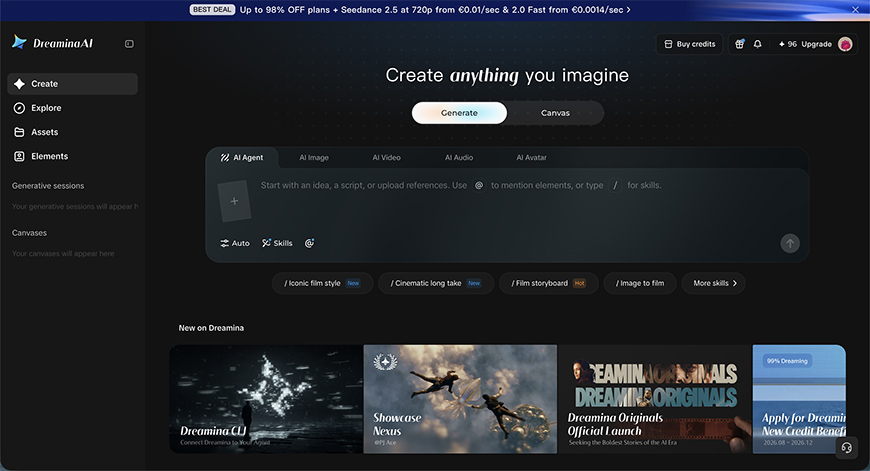
There are currently ten models, eight of which are native. So, the choice for parter models is limited, but you have more Seedance options with different capabilities. Some of them are faster, others are more cost-effective, etc.
Some models support the Omnireference feature, which lets you upload different types of media to complement your prompt.
There are six aspect ratios, and some models support resolutions up to 4K. Note that in some cases, the native resolution is 720p and is upscaled after that.
Dreamina Seedance 2.5 draft lets you test ideas at low resolution to save credits. Videos can be up to 30 seconds long.
Canva mode lets you keep text, images, videos, characters, and any other assets you need in a single workspace to create a project. You can also open videos from the Explore version and see the entire workflow on the Canvas.
There’s also an AI Agent with an Auto mode if you prefer to let it choose the best AI model for your project. It also includes different skills like TV commercial, Shot design, and others.
Using the AI Agent mode also supports a citation system using the @ symbol to reference characters, images, and other assets to simplify your prompt.
Pricing
If the free use of Dreamina AI doesn’t cover your needs, you can upgrade to one of its four memberships. They’re all available for one month or by monthly, quarterly or yearly subscriptions.
Unlike the other options mentioned in the article, you can’t pay monthly if you subscribe to a yearly plan. This isn’t ideal if you have a tight budget because longer memberships offer the lowest prices.
So, yearly plans range from US$137.99 to US$4,319.99 depending on the plan. This translates to US$11,50 and US$360 per month. However, monthly plans range from US$15 to US$495.
From tier to tier, you’ll have a different number of credits available (from 1,361 to 51,067) and, of course, different benefits related to AI model availability, priority queuing, resolution, etc.
Commercial use
Dreamina AI is fully integrated with CapCut, but they aren’t the same service, and they aren’t run and developed by the same company. Therefore, they have separate terms and conditions that you have to be aware of.
While commercial use of AI-generated content on Dreamina is allowed, not all assets and templates on CapCut are. So, double-check on your side to stay on the safe side.
That said, ByteDance (the parent company of Dreamina and Seedance) is facing legal action over copyright issues, according to the Trademark Lawyer. It also recently received a cease-and-desist letter from Disney, according to the BBC.
Final Verdict: Which AI Video Generator Should You Choose?
All five platforms offer impressive video generation capabilities, but their strengths go beyond the quality of the videos they produce.
For filmmakers and storytellers, LTX Studio and Google Flow offer useful tools for planning and assembling more complex projects. Runway and Dreamina provide plenty of opportunities for creative experimentation.
However, commercial use deserves particular attention, especially if you’re producing content for clients, advertising campaigns, or branded projects.
While all five platforms allow commercial use under certain conditions, that doesn’t necessarily mean they offer the same protections against copyright claims.
This is where Adobe Firefly stands out. Its native Firefly video model is trained on licensed and public domain content, with Adobe taking a commercially safe approach to AI generation. Eligible enterprise customers may also benefit from IP indemnification.
Ultimately, the best choice comes down to your creative workflow, budget, and how you intend to use the finished videos.