


Google Chrome Beefs Up Security With Session Credentials on Windows 11

Protecting your PC and profiles from constant malware and attacks, seemingly doomed to be a never-ending tug-of-war between security and bad actors. Somebody has said ‘enough’ and that’s Google. To combat a rise in session hijacking and theft of accounts without passwords, they’ve released their own answer for Windows 11 users in the form of Google Chrome session credentials.
This new technology has big implications, not just for your online security, but for the industry as a whole. This article will look at why.
The Rise of Session Hijacking
Password protection and multi-factor authentication have been mainstays of internet security for years, and for good reason: they are robust and very hard to crack. Unfortunately, hackers have found a way around this, and, rather than brute-forcing passwords, they have chosen to bypass the front door entirely. The best way through is past.
Cookie theft is the name of the game with session hijacking. Specialist malware like Lumma C2 or Redline infiltrates a PC and steals the active session cookie, exfiltrating it. The hacker needn’t worry about the password because they’ve effectively bypassed it and can now use an account as if they were the victim, already logged in.
It’s a major issue that has increased in frequency in the past few years, one that Google has sought to combat from the ground up. Time to reinvent the playing field.
Changing Internet Security With Google Chrome Session Credentials
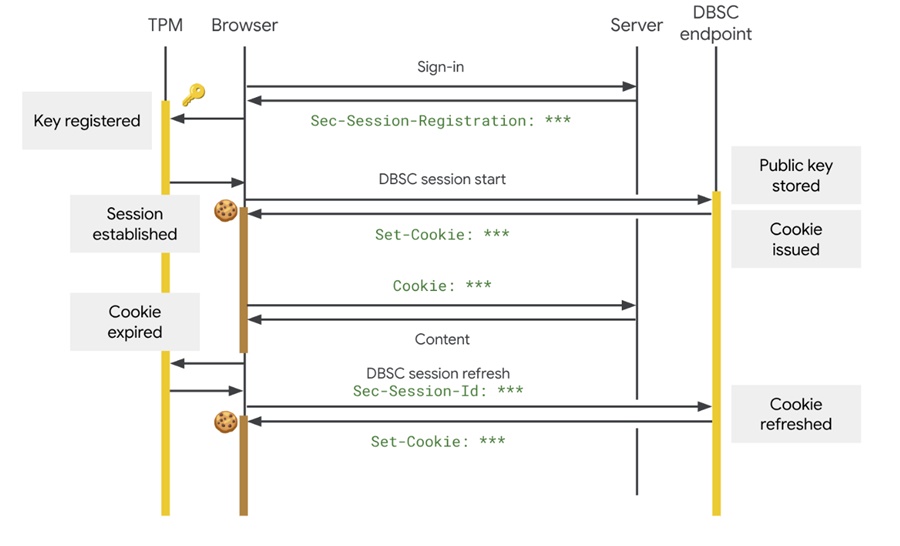
As of Google Chrome 146 and onwards, the tech giant has included its solution to session hijacking. The full name of the protocol is Google Device Bound Session Credentials (quite the mouthful, we know) and was developed through a W3C process together with Microsoft to become, ultimately, an open web standard.
So, what does it entail? While internet security has mostly focused on the front door to this point, Google’s new protocol moves security checks inside for constant monitoring. It uses cryptographic hardware binding – through measures like the TPM security module – to add an extra layer of protection to sessions. Both a session cookie and the same physical device will be required, through keys tied to hardware. So far, so robust.
If a session cookie is exfiltrated, the hacker won’t be able to hijack an account if using a different device. In addition, Google Chrome doesn’t send device identifiers to servers, so your PC is safe from device fingerprinting.
It’s a big move that could indicate a fundamental shift in industry security. Not only will enterprises and their IT departments benefit from stronger protection against stolen session cookies, but websites that adopt DBSC can strengthen protection against session theft by binding authenticated sessions to trusted devices. Smaller sites will be able to add extra security through processes like dedicated constant rotation and session refreshing.
The fact that Google has developed this with Microsoft and made it an open standard protocol shows their ambitions and hopes for this new technology.
What Does It All Mean on Windows 11?
The good news is that you’re probably using this technology already. Windows 11 users (from Chrome 146) have access to Google Device Bound Session Credentials by default, protecting everything from your Google Workspace to a simple Google account. There’s no action required to use it, and even organizations have it enabled. It’s free protection that’s ready to go.
Apple users will have their own upgrades coming to Mac soon. Interestingly, an earlier version of the credential protocol has been in use by Chrome for the past year before this implementation.
Can’t Forward Emails in Outlook? 4 Fixes to Try
Read Next