



How to Fix Wi-Fi Disconnecting When PC Is Locked
When Wi-Fi disconnects when PC is locked, a power-saving setting can be one possible cause, although driver, network, and router issues can also be responsible. Here is how to find the one responsible.
Why Wi-Fi Disconnects When PC Is Locked
Locking your PC can be related to power-management behavior, depending on your device and its configuration. Your wireless adapter may be affected by its power-saving settings.
There are three separate power controls that can each do this on their own, plus a roaming setting that makes the adapter hunt for a better access point and lose the current one in the process. Because they are independent, you need to turn each one off before you determine the problem.
Fix 1 – Stop Windows From Turning Off the Adapter
This is the setting responsible most of the time, and it is the first thing to check.
Step 1. Right-click the “Start” button and open “Device Manager.”
Step 2. Expand the “Network adapters” category, right-click your Wi-Fi adapter, and choose “Properties.” The Wi-Fi adapter may have a name containing terms such as “Wireless,” “Wi-Fi,” or the name of its manufacturer.
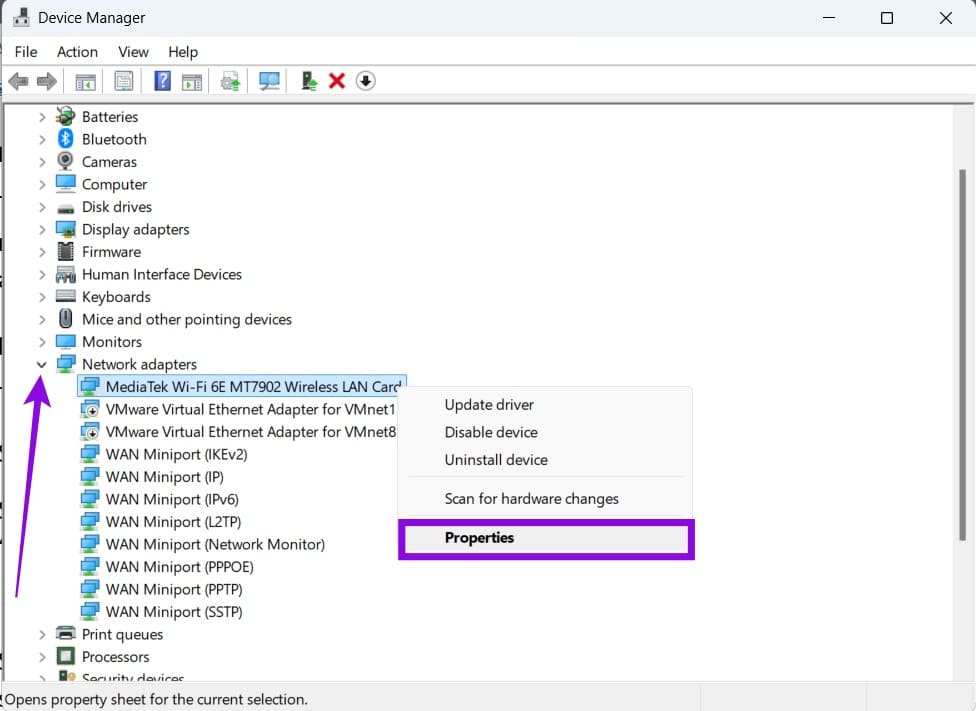
Step 3. Go to the “Power Management” tab and uncheck “Allow the computer to turn off this device to save power.” If it isn’t there, go to the “Advanced” tab, click on “Power Saving” from the list, and change it to “Disabled.”
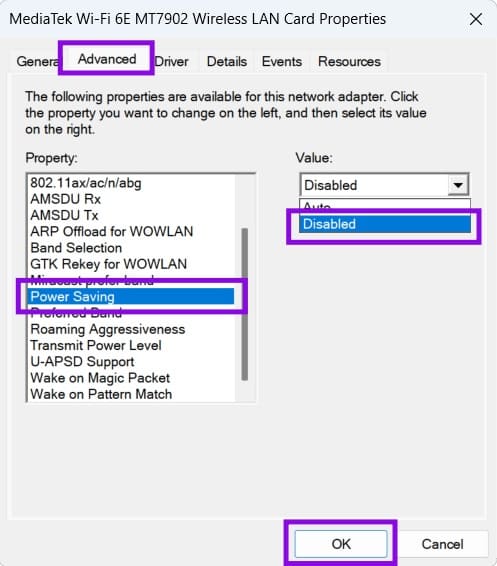
Step 4. Click on “OK” to confirm the change.
Fix 2 – Set the Wireless Adapter to Maximum Performance
The power plan has its own wireless control, and it is separate from the Device Manager checkbox above. Many people clear the checkbox, see no improvement, and give up here. Here’s how to fix this when if wi-fi disconnects when computer is locked.
Step 1. Search for and open the Control Panel, then go to “Power Options.”
Step 2. Click “Change plan settings” next to your active plan, then “Change advanced power settings.”
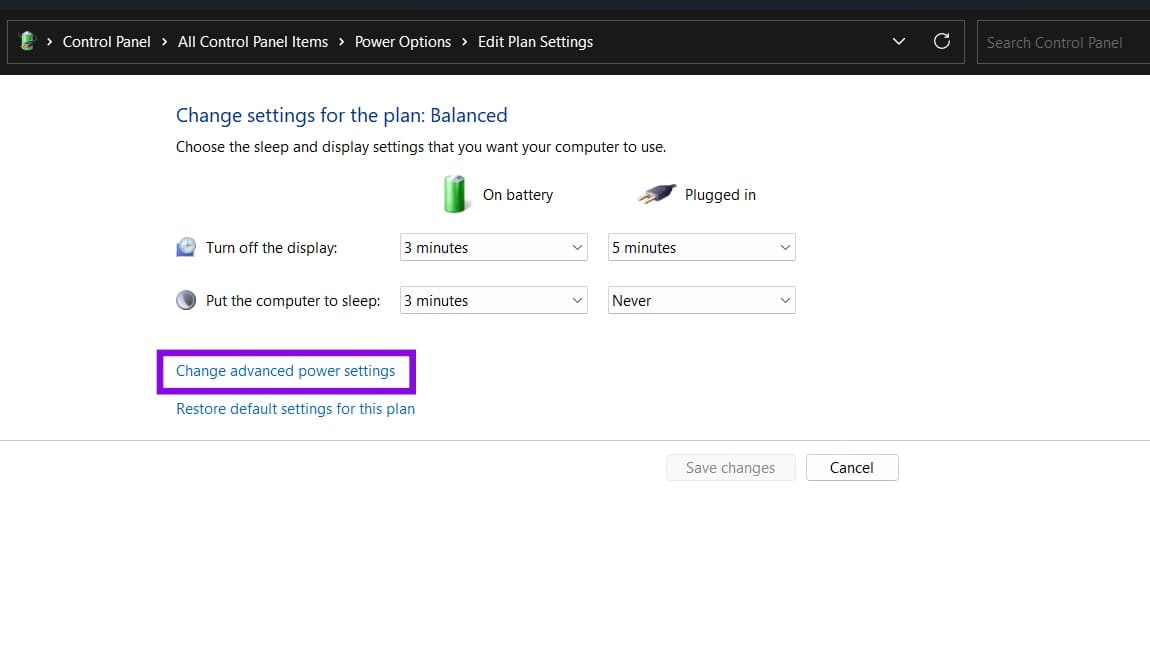
Step 3. If “Wireless Adapter Settings” and “Power Saving Mode” are available, set the appropriate option to “Maximum Performance.” On laptops, they may be listed as the “On battery” and “Plugged in” settings.
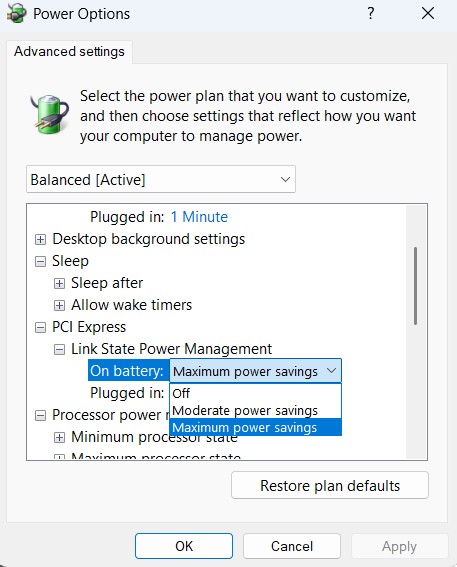
Step 4. While you are in the same window, expand “PCI Express,” then “Link State Power Management,” and set both states to “Off” for testing.
Step 5. Click “Apply,” then “OK.”
On laptops, “Link State Power Management” is a separate PCI Express power setting when available, but it does not specifically control most internal Wi-Fi adapters. If you are testing this setting, note that the available options may include “Off,” “Moderate Power Savings,” and “Maximum Power Savings.”
Fix 3 – Turn Off Roaming Aggressiveness
Roaming aggressiveness dictates how often the adapter looks for a stronger access point. This makes sense if you have a mesh system so a laptop can connect to multiple points. On a network with multiple access points, a high roaming aggressiveness setting may cause the adapter to search more readily for another access point.
Step 1. Open “Device Manager” and expand “Network adapters.”
Step 2. Right-click on the Wi-Fi adapter, choose “Properties,” and open the “Advanced” tab.
Step 3. Select “Roaming Aggressiveness” in the property list and set the value to “Disabled.”
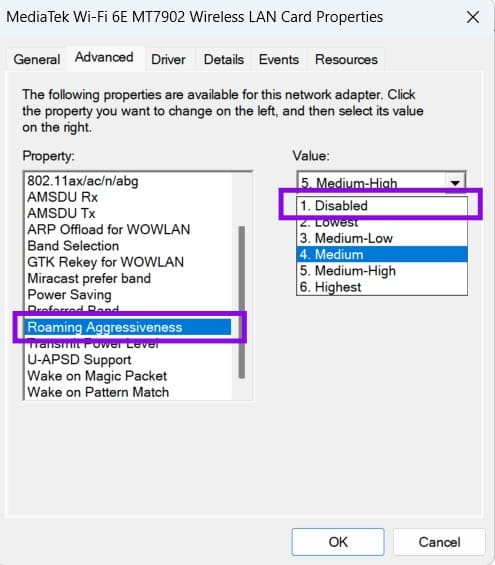
Step 4. Click “OK.”
The name can vary between manufacturers but usually involves “roaming.”
Fix 4 – Roll Back or Reinstall the Wi-Fi Driver
If the issue where the Wi-Fi disconnects when the computer is locked happened after a Windows update, this could be a driver issue. Windows Update installs network drivers automatically, and a newer version might not be better for a specific model.
Step 1. In “Device Manager,” right-click your Wi-Fi adapter and choose “Properties.”
Step 2. Open the “Driver” tab and click “Roll Back Driver,” then follow the prompts.
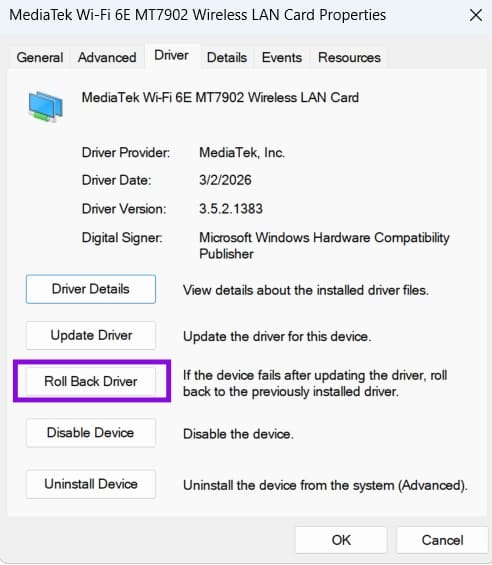
Step 3. If “Roll Back Driver” is greyed out, there is no previous version stored. Download the driver directly from your PC or adapter manufacturer’s support page and run the installer instead.
Fix 5 – Check for Software Conflicts
If all four fixes above change nothing, something outside Windows power management is dropping the connection. This can be anything from VPN clients, third-party security suites, to corporate network management software. You can temporarily disable them to check if they’re the culprit.
Step 1. Press “Windows + R,” type “msconfig,” and hit “Enter.”
Step 2. On the “Services” tab, select “Hide all Microsoft services,” then click “Disable all.” This helps isolate potential conflicts while leaving Microsoft services enabled.
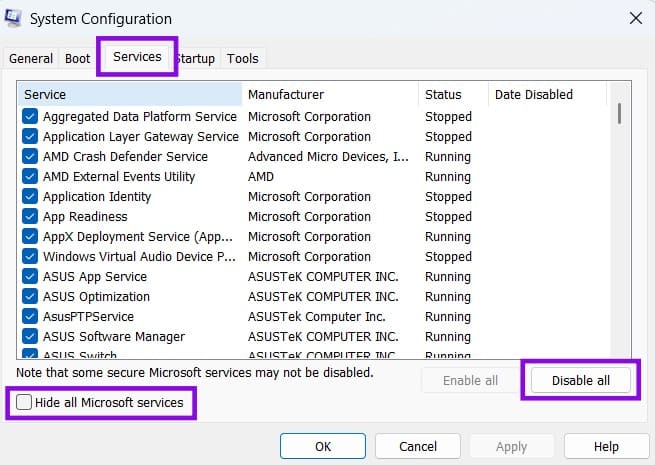
Step 3. Restart the PC and lock it to see whether the connection holds. If it does, re-enable services in small batches until the problem returns.
If that doesn’t help, try Network Reset as a last resort. Go to “Settings” > “Network & internet” > “Advanced network settings” > “Network reset,” then select “Reset now.” This removes and reinstalls your network adapters and resets their settings. You may need to reconnect to Wi-Fi networks and reconfigure VPN clients or other networking software afterward.
Screenshot Not Working (Windows 11) – Try These 6 Fixes
Read Next