


Best AI Photo-to-Video Tools for Professional Creators in 2026

The best AI photo-to-video tool for professional creators depends on the level of creative control you need, your commercial licensing requirements and how the software fits into your existing editing workflow.
Adobe Premiere is a strong option for professional creators who want to combine AI image-to-video generation with video editing in a connected creative workflow. Kling AI offers advanced motion controls, while Artlist, VEED and Canva cater to different creative and production needs.
In this guide, I compare five AI photo-to-video platforms based on their generation features, creative controls, pricing, commercial licensing, export options and editing workflows.
Whether you’re animating product photography for a client campaign, creating social media content or incorporating AI-generated footage into a larger video project, here are the key differences to consider.
Best AI Photo-to-Video Tools for Professional Creators Compared
| Tool | Best For | Key Features | Starting Price (USD) | Commercial Use |
| Adobe Premiere | Connected professional video production workflows | Firefly and partner AI models, integrated video editing | Free mobile access; desktop from $22.99/month | Subject to model and applicable terms |
| Kling AI | Advanced AI motion control | Multiple proprietary video models and motion controls | Limited free access; paid from $8.80 | Eligible paid plans |
| Artlist AI Toolkit | Multi-model generation and production assets | Multiple AI models, stock footage and music ecosystem | Limited free trial; paid from $11.99/month | Eligible paid plans |
| VEED | Browser-based video generation and editing | Multiple AI models, subtitles and online editing | Limited free credits; paid from $12/month | Subject to plan and licensing terms |
| Canva | Social media and marketing content | Automatic and custom animation, design templates | Limited free access; Canva Pro from $18/month | Subject to AI and asset licensing terms |
Pricing, generation allowances and licensing terms may vary depending on your region, billing period, subscription and selected AI model.
1. Adobe Premiere – Best for Connected Professional Video Production Workflows
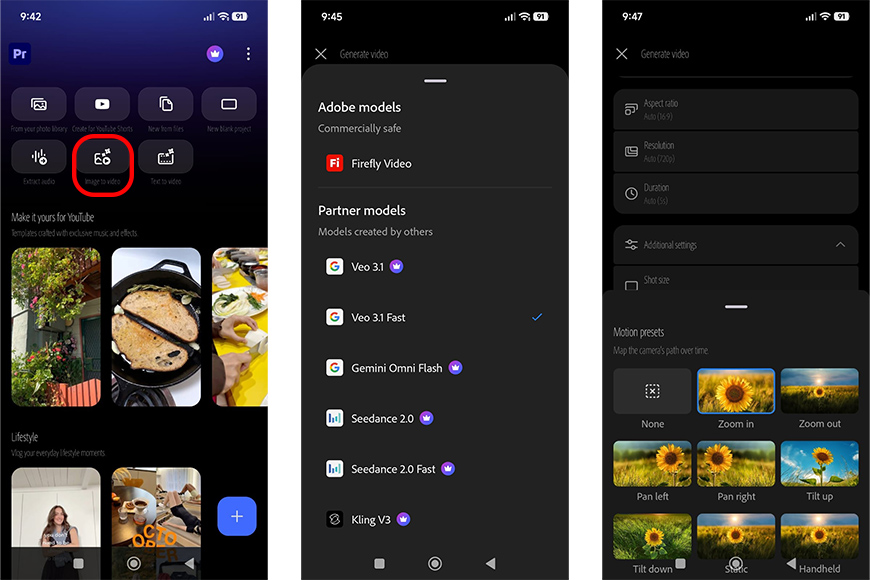
Tested in November 2026 with Adobe Premiere mobile version 26.6.0 on Android 16.
With more than 40 years of experience developing creative technology, Adobe has built an ecosystem of professional applications that work together across different stages of production.
Adobe Premiere combines professional video editing with generative AI capabilities, allowing creators to incorporate AI-generated footage into their projects while maintaining control over their creative decisions.
The Premiere mobile app extends this workflow to creators working on the go, making it possible to generate and edit video content directly from a mobile device.
Pricing and Free Access
Adobe Premiere is available as a standalone desktop subscription, while the Premiere mobile app is free to download and offers access to selected editing and generative AI features.
Free Adobe accounts have limited access to image-to-video generation. Additional generations and access to certain AI models may require generative credits or an eligible paid subscription.
The Adobe Premiere desktop plan starts at $22.99 per month with an annual commitment. A monthly subscription is available at a higher price, and Adobe also offers a seven-day free trial for eligible users.
Another way to access Premiere is through the Creative Cloud Pro plan, which includes applications such as Photoshop, Illustrator, After Effects and Firefly.
Image-to-Video Features and Creative Controls
Premiere makes image-to-video generation particularly accessible on mobile. You simply select the Image-to-Video feature on the home screen.
You can then select Adobe’s own Firefly model or choose from available partner models.
Each model offers different generation settings, which may include aspect ratio, frame rate, camera movement and other creative controls.
Upload the image you want to animate, describe the desired movement with a text prompt and generate the video.
Once the video is ready, you can save or share it, or add it to the timeline to continue editing.
This makes Premiere more than a standalone image-to-video generator. Creators can incorporate generated clips into larger projects, combine them with existing footage, add audio and refine the final edit.
Desktop Premiere provides more advanced editing capabilities for professional production, including color correction, audio editing and detailed timeline controls.
Creators can also generate image-to-video clips in Adobe Firefly and import the resulting footage into Premiere for further editing.
Pro tip: If your primary focus is generating creative assets rather than editing video, Adobe Firefly may be a suitable starting point. You can then bring the generated footage into Premiere when more advanced editing is required.
Watermarks and Commercial Use
Adobe’s own Firefly models are designed with commercial use in mind and are trained on content including licensed material and public domain content.
Adobe also offers intellectual property indemnification for certain eligible customers and Firefly outputs, subject to applicable terms and conditions.
It’s important to distinguish between Adobe’s own Firefly models and the partner AI models available through its applications. Commercial usage rights and protections may differ depending on the selected model, subscription and applicable terms.
Adobe also supports Content Credentials, which can provide information about the creation and editing history of digital content, including the use of generative AI.
As with any AI generation platform, creators should ensure they have the necessary rights to the source images they upload and review the applicable licensing terms before using generated footage commercially.
Best For
Adobe Premiere is particularly well suited to professional creators who want image-to-video generation to form part of a complete video production workflow.
The mobile app is useful for creators working on the go, while desktop Premiere provides more advanced tools for editing and refining footage.
Premiere is also a practical option for professionals who already use Adobe applications and want to move between different creative tasks within the same ecosystem.
2. Kling AI – Best for Advanced AI Motion Control
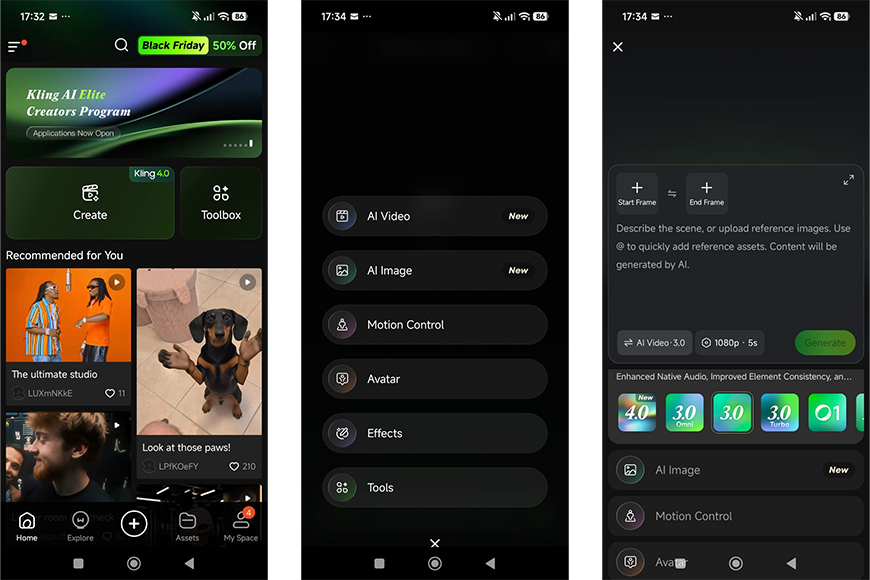
Tested in November 2026 with Kling AI mobile version 3.10.30.424 on Android 16.
Kling AI is a platform dedicated to generative video, including transforming still images into short video clips.
Originally developed by Kuaishou as a proprietary visual synthesis engine, Kling AI has expanded into a creative platform with multiple video-generation models and advanced motion controls.
Its focus on motion generation makes it particularly interesting for filmmakers and creators who want greater control over how subjects and scenes move.
Pricing and Free Access
Upon signup, Kling AI offers complimentary credits that allow new users to explore its generation features.
The Standard plan starts at $8.80 and includes 660 credits.
Higher-tier Pro and Premier plans offer additional credits and access to selected generation features.
The number of credits required to generate a video depends on the selected model, duration, resolution and generation settings.
Image-to-Video Features and Creative Controls
Unlike platforms that support multiple third-party AI engines, Kling uses its own video-generation models within its interface.
However, Kling offers several versions of these models, each with different capabilities, controls and performance characteristics.
While some models prioritize faster generation and lower costs, others focus on visual realism, motion consistency and more advanced creative control.
You can animate still photographs using both the mobile app and the browser-based platform.
The browser-based version provides a more comprehensive environment for creators who want to explore additional generation settings and incorporate the resulting footage into larger projects.
Watermarks and Commercial Use
Videos generated using free credits may include a visible Kling AI watermark and be subject to personal-use restrictions.
Eligible paid subscriptions provide commercial usage options, subject to Kling’s applicable licensing terms.
Professional creators should confirm the rights associated with their selected plan before incorporating generated footage into paid advertising or client projects.
Best For
Kling AI is best suited to creators who prioritize motion generation and want greater control over how still images are animated.
It is particularly relevant to filmmakers and creative teams looking to generate footage for further refinement in a dedicated video editing application.
3. Artlist AI Toolkit – Best for Multi-Model Generation and Production Assets
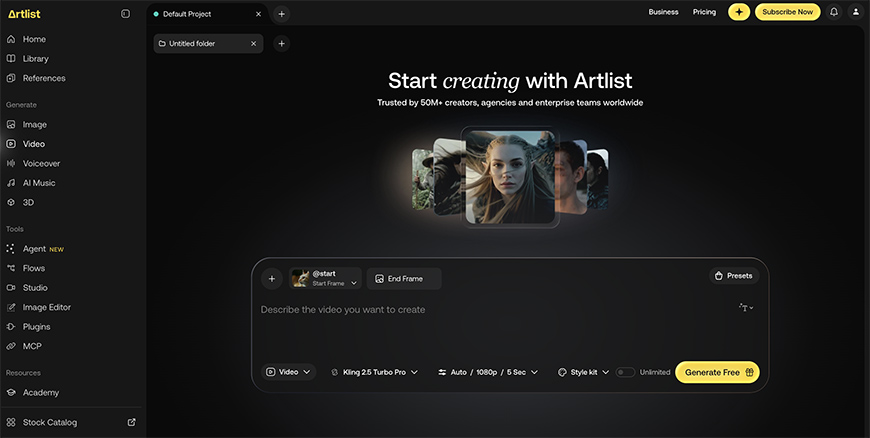
Tested in November 2026 using Artlist in Google Chrome on macOS Tahoe 26.3.1.
Artlist is a well-established platform in the video production industry, originally recognized for its royalty-free music library before expanding into stock footage, effects and other creative resources.
Its AI Toolkit provides access to multiple generative AI models, allowing creators to experiment with different approaches to video creation, including turning still images into dynamic video content.
Pricing and Free Access
Artlist offers limited complimentary generations for users who want to explore its AI tools.
The trial includes an opportunity to test video generation, although trial outputs are subject to download and usage restrictions.
Artlist’s AI Starter plan starts at $11.99 per month and includes 16,500 monthly credits.
Higher tiers start at $23.99 and $59.99 per month, with 40,000 and 120,000 generative credits, respectively.
These prices refer to annual billing. Monthly subscriptions are available at higher prices.
Image-to-Video Features and Creative Controls
Artlist supports image-to-video generation through multiple third-party AI models.
To animate a photograph, select a model that supports uploading a still image as the first frame, such as Kling 2.5 Turbo Pro.
Video duration, resolution and generation controls depend on the selected model and settings, with some options supporting resolutions up to 4K.
Access to multiple models gives creators the flexibility to explore different generation approaches without subscribing to each model provider separately.
Watermarks and Commercial Use
Artlist offers licensing options designed for professional video production, including client and agency projects.
However, usage rights depend on the selected subscription, AI model and applicable licensing terms.
Media generated during a free trial is subject to download and commercial usage restrictions.
Creators should review Artlist’s AI licensing terms separately from its stock footage and music licensing agreements.
Best For
Artlist AI Toolkit is particularly suitable for filmmakers and video creators who want access to multiple AI generation models alongside music, stock footage and other production assets.
It is a practical option for creators looking to incorporate AI-generated footage into larger video projects rather than simply producing standalone clips.
[separator type=”thin”]
4. VEED – Best for Browser-Based Video Generation and Editing
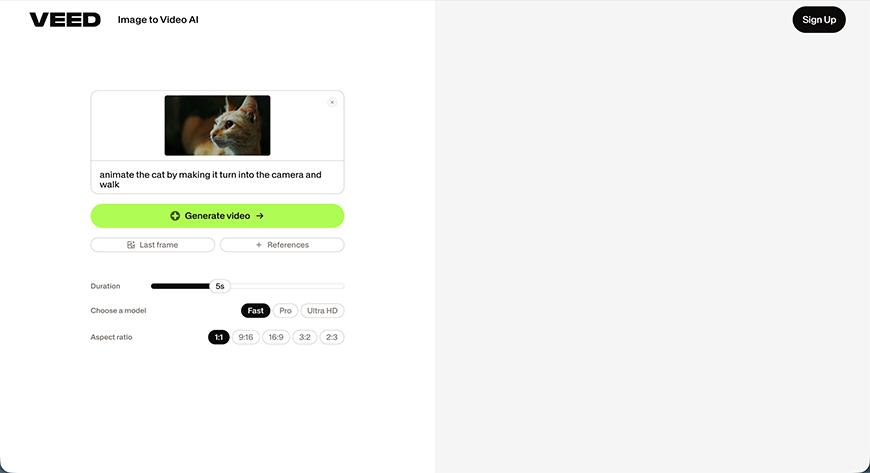
Tested in November 2026 using VEED in Google Chrome on macOS Tahoe 26.3.1.
VEED is an online video editing platform that has expanded into AI-powered video generation. Its AI Playground allows users to turn still images into videos alongside other generative AI features.
One of its biggest advantages is the combination of AI generation and video editing tools.
Creators can continue working on generated videos by adding subtitles, text, music and branding elements without moving to a separate editing application.
Pricing and Free Access
VEED offers complimentary credits upon signup, allowing users to explore selected AI generation features.
The Creator plan starts at $12 per month and includes 6,000 credits, while the Pro plan starts at $24 per month and includes 18,000 credits.
The number of videos these credits can generate depends on the selected AI model, video duration, resolution and other settings.
Paid plans also provide access to additional editing features, subtitles, branding tools and media assets, depending on the subscription.
Monthly subscriptions are available at higher prices.
Image-to-Video Features and Creative Controls
VEED supports image-to-video generation through third-party models such as Google Veo and Kling AI.
The resolution, duration and available generation controls depend on the selected model and subscription.
Some models support higher-resolution video generation, although export options may also depend on the user’s subscription.
VEED’s integrated editing tools make it particularly accessible to creators who want to generate and edit video content without learning advanced video editing software.
Watermarks and Commercial Use
Free generations and exports may be subject to VEED watermark restrictions.
Paid subscriptions provide additional export and commercial usage options, subject to applicable licensing terms.
Creators should also review VEED’s privacy policies and AI training settings before uploading confidential client photographs or unreleased campaign assets.
Best For
VEED is best suited to creators who want a browser-based environment for generating, editing and preparing video content.
Its accessible editing tools are particularly useful for marketers, e-commerce brands, corporate trainers and social media teams that do not require advanced professional editing features.
5. Canva – Best for Quick Social Media and Marketing Content
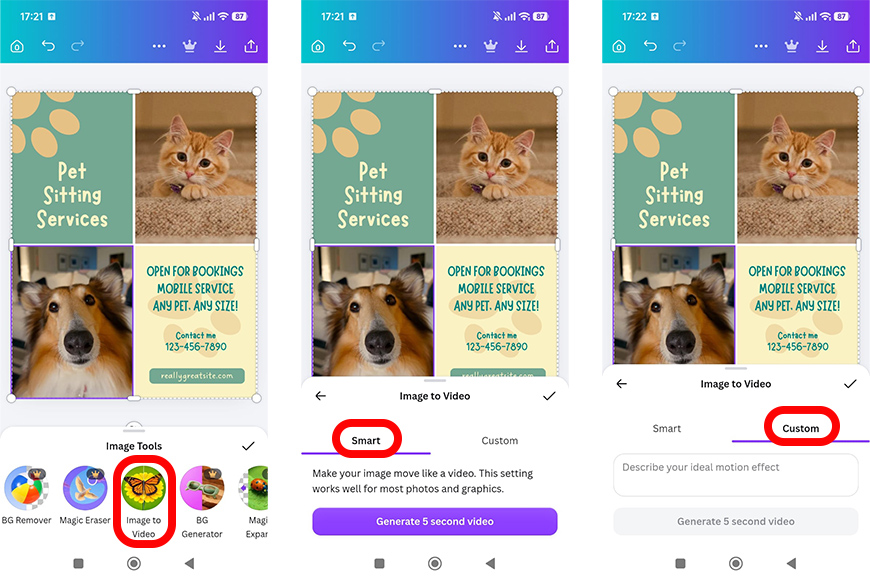
Tested in November 2026 with Canva mobile version 2.387.0 on Android 16.
Canva is an all-in-one graphic design and content creation platform that includes AI-powered image-to-video generation.
This feature allows users to animate existing photographs, illustrations and graphics by applying automatic motion or describing the desired movement with a text prompt.
Generated clips can be added to the Canva editor, where creators can combine them with text, music, branding and other design elements.
Pricing and Free Access
Canva offers a free plan that includes limited access to selected AI features, including image-to-video generation.
Free users have more limited generation allowances and export settings than paid subscribers.
Canva Pro starts at $18 per month for individual creators, with additional AI allowances, increased cloud storage, brand kits and access to more templates and creative assets.
Monthly and annual subscription options are available.
Image-to-Video Features and Creative Controls
Canva’s image-to-video feature provides a simplified approach to animating photographs.
The tool generates short video clips and allows users to choose between Smart and Custom generation options.
The Smart feature automatically generates motion, while Custom allows users to describe the movement they want to create.
Compared with dedicated AI video-generation platforms, Canva offers a more simplified set of motion controls.
This makes it accessible to creators who want to produce animated content quickly without configuring more advanced generation settings.
Watermarks and Commercial Use
AI-generated videos may be exported without a watermark, depending on the features and assets used.
However, not every asset within Canva is available under the same licensing terms.
When incorporating generated footage into a larger design, check whether any premium templates, stock images, music or other creative assets require a paid subscription or separate licensing.
Professional creators should also review Canva’s applicable AI terms before using generated content commercially.
Best For
Canva is best suited to social media managers, marketers and content creators who want to incorporate animated photographs into ready-to-publish designs.
Its simplified generation controls make it a practical option for short product animations, social media posts and marketing materials that do not require advanced motion control or professional video editing.
How I Evaluated the AI Photo-to-Video Tools
This comparison considers the available generation features, creative controls, pricing, licensing and editing capabilities of each platform.
The mobile applications and browser-based platforms used are identified in the testing statements throughout the article.
Rather than providing a controlled benchmark of generated video quality, the comparison focuses on how each tool fits into different creative workflows.
Generation results can vary depending on the source image, prompt, selected AI model and generation settings.
Using AI Photo-to-Video Tools in Professional Creative Workflows
For professional creators, generating a video from a still image is often only the first stage of a larger production workflow.
A photographer might animate a product photograph for a commercial campaign, while a video editor might use AI-generated footage to create an establishing shot, transition or short social media sequence.
Adobe Firefly and Premiere provide a connected approach to this process. Creators can generate footage from still images using Firefly and bring the resulting clips into Premiere for further refinement.
A typical professional workflow could include:
- Prepare the source photograph, considering the intended composition and aspect ratio.
- Use Adobe Firefly or Premiere mobile to generate video from the still image.
- Describe the desired subject movement, camera motion and visual style using a text prompt.
- Review the generated footage for unwanted movement, visual artifacts and consistency with the original image.
- Bring the selected clip into the Premiere timeline and refine its duration, color, pacing and audio.
- Combine the generated footage with existing video assets and prepare the final export for the intended delivery platform.
This approach allows AI generation to support the creative process while leaving editorial decisions, visual refinement and final delivery under the creator’s control.
How to Choose the Best AI Photo-to-Video Tool
The right AI photo-to-video platform depends on the type of content you’re producing and how the generated footage will be used.
Creative Control and Motion Quality
Look for tools that allow you to describe subject movement, camera motion and the desired visual style.
For professional projects, maintaining consistency with the original photograph can be just as important as generating realistic movement.
Check generated footage for unwanted changes to product details, facial features, branding and background elements.
Commercial Licensing and Privacy
If you’re creating footage for clients, paid advertising or commercial campaigns, check the licensing terms associated with the selected AI model and subscription.
Also consider how the platform handles uploaded images, particularly when working with confidential client assets or unreleased campaign material.
Editing and Production Workflows
Some platforms are designed primarily for generating short video clips, while others combine generation with editing and production tools.
For professional video production, the ability to refine generated footage, combine it with existing assets and control the final export can be just as important as generation itself.
Pricing and Generation Credits
Compare more than the monthly subscription price.
Video generation can consume different amounts of credits depending on the model, resolution, duration and generation settings.
Consider how many generations you may need to achieve a usable result, particularly when working on commercial projects with specific creative requirements.
FAQs
What is the best AI photo-to-video tool for professional creators?
Adobe Premiere is a strong option for professional creators who want to combine AI image-to-video generation with a complete video editing workflow. Kling AI and Artlist may also be suitable for creators who prioritize advanced generation controls or access to multiple AI models.
Can Adobe Premiere turn a still image into a video?
Yes. Adobe Premiere mobile offers image-to-video generation features using available AI models. Creators can also generate video from still images using Adobe Firefly and import the resulting footage into Premiere for further editing.
Can I use AI-generated videos for commercial projects?
Many AI video platforms offer commercial usage options. However, licensing rights depend on the selected AI model, subscription and applicable terms. Always confirm that you have the necessary rights to both the source image and generated footage.
Are there free AI photo-to-video generators?
Yes. Several platforms, including Adobe Premiere mobile, Canva, Kling AI and VEED, offer limited free access or complimentary generation credits. Free generations may be subject to watermark, download, resolution or commercial usage restrictions.
Can AI-generated videos be edited in Premiere?
Yes. Compatible AI-generated video files can be imported into Premiere, where creators can trim clips, adjust color, add audio, combine footage and prepare the final video for delivery.
What makes a good source image for AI video generation?
A clear, high-quality photograph with a well-defined subject and suitable composition is generally a good starting point. A detailed prompt describing the desired movement can also help guide the generation process.
Final Thoughts
AI photo-to-video tools give professional creators new ways to repurpose still photographs, develop creative assets and generate footage for video projects.
The best platform depends on your priorities. Kling AI is worth considering for advanced motion generation, Artlist for access to multiple models and production assets, VEED for browser-based video creation, and Canva for quick social media and marketing content.
For professional creators who want AI generation to form part of a complete video production workflow, Adobe Premiere offers a connected approach to generating, editing and refining footage.
The ability to move between Adobe Firefly and Premiere allows creators to incorporate generative AI into their existing production processes while maintaining control over creative decisions and final delivery.
Explore Adobe Firefly to generate video from your still images and refine the resulting footage in Adobe Premiere for your next professional creative project.
This article is sponsored by Adobe and contains affiliate links. We may earn a commission if you make a purchase through these links, at no additional cost to you. All opinions and testing observations are our own.