






How To Check if Someone Else is Using Your Gmail Account
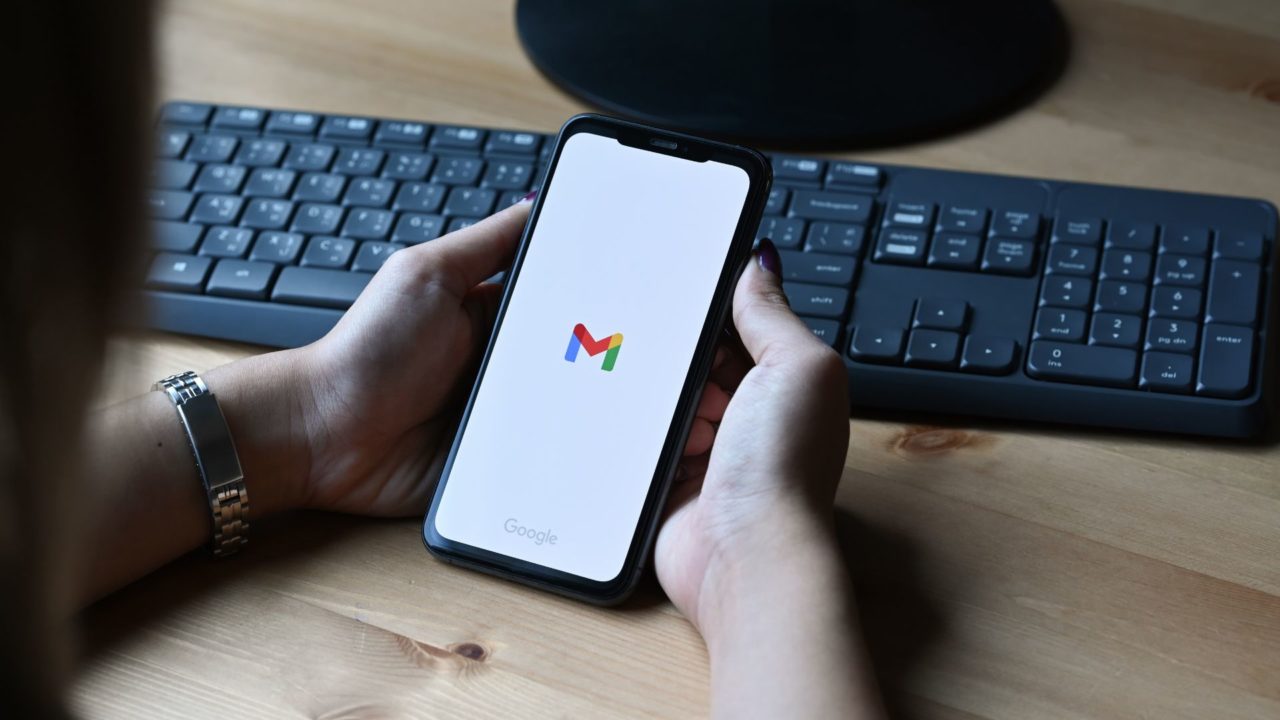

You often sign into a device using your Gmail account and forget to sign out. Or you share your account’s password with someone you trust but don’t change it later. These are just some of the many ways you compromise the safety of your Gmail account and let someone access it without you even knowing about it. This guide looks at various methods to identify if someone else is using your Gmail account.
How to Know if Someone Else Is Using Your Gmail Account
There are often signs that your Gmail account has been hacked. Emails you didn’t send, complaints from contacts that you sent them spam or malware, emails from organizations you never heard of confirming account creation, or something else entirely.
While indicative of something going on, they are far from definite. Fortunately, Google takes account safety and privacy very seriously and provides a tool to check your account’s activity.
1. Check Your Account’s Login Activity
- Open Gmail and log into your account.
- Scroll to the bottom of your Inbox page and find the Details link in the bottom right.

- A pop-up page will display information about the last activity on this mail account and any concurrent activity.

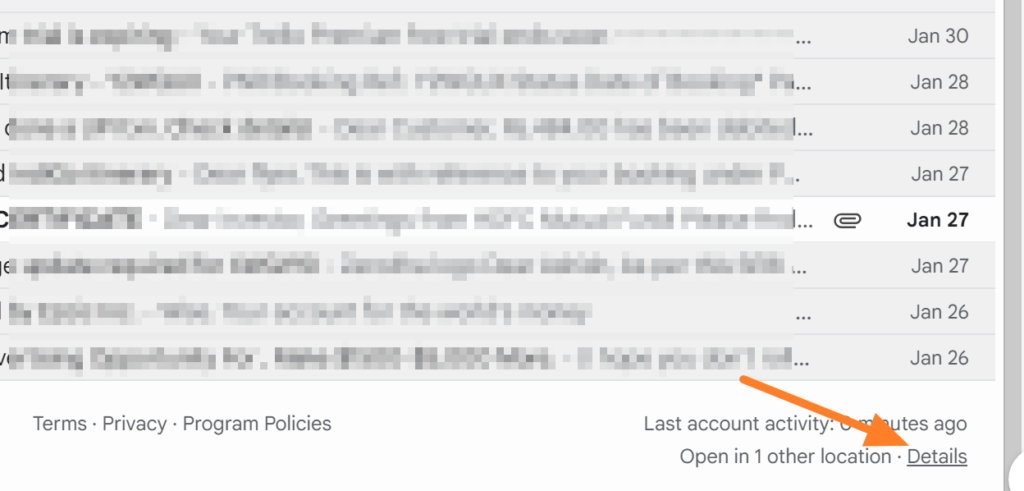
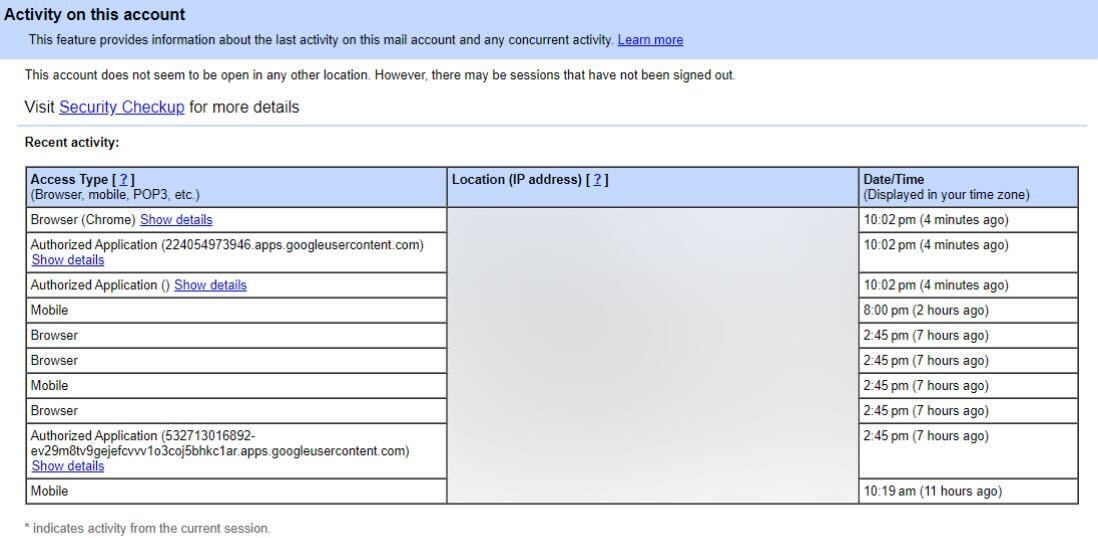
The page will display concurrent session information, including Access type (browser, mobile, POP3, IMAP, etc) and Location (IP address). It will also display Recent activity in a tabular format that shows Access type, IP address, and Date/time. Check through this to see if you notice anything suspicious.
If you don’t see the Details link at the bottom of your Gmail inbox, use the Recent Security Activity page.
2. Do a Security Check
If you’re not convinced you have complete control over your Gmail account, there are a few more things to look out for. This includes checking for changes to your Gmail account name, contact information, 2-factor authentication, and recovery email. Additionally, it’s important to check if any other accounts connected to your Gmail account have been compromised.
You can also search your Trash folder for any emails that might have been sent by hackers from your account.
3. Check for Unrecognized Devices
Lastly, visit your Account Security page and look for any Security Alerts. Navigate through your devices and remove any older ones you no longer use or those you don’t recognize. If there is any, click on it and choose to sign out of the device.
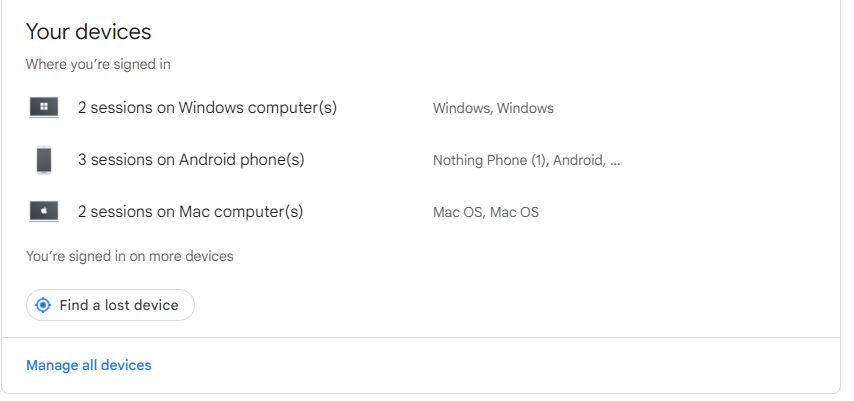
It may so happen that an old device that you had forgotten about may have been reaccessed, and you missed the notification. So, use a combination of date, device type, and other indicators to determine that the device is compromised.
What to Do if Your Gmail Has Been Hacked
If you find anything wrong with the Security check and someone else is using your Gmail account, you must act quickly. The longer you wait, the more spam or malware they could send and the more photos or files they may download from your Google Drive.
You can do some simple things to lock your Gmail account down.
1. Change your Gmail password
The first step is obviously to change your Gmail login password. This will prevent the hacker from being able to log back into your Gmail account to continue their nefarious work.
- Go to your Google account’s security page.
- Select Signing in to Google and select Password.

- Enter your current password.
- Select to change that password and enter a new one.
- Press the Change Password button to confirm the change.

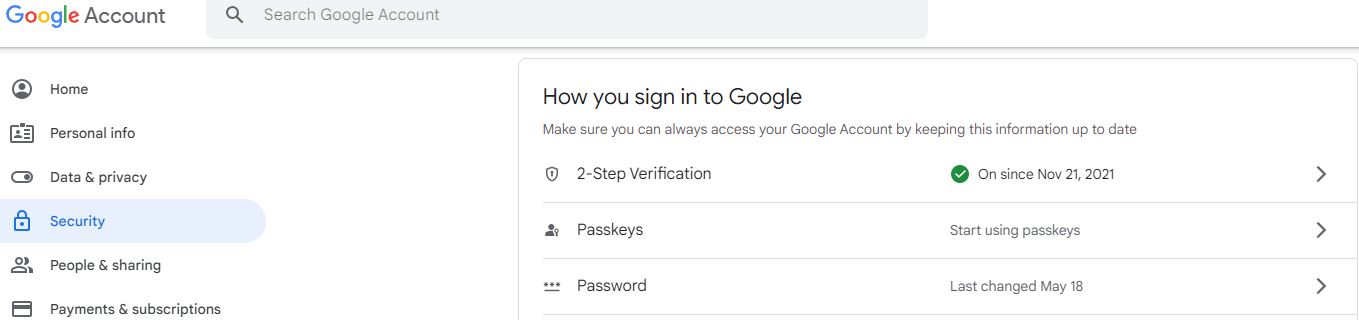
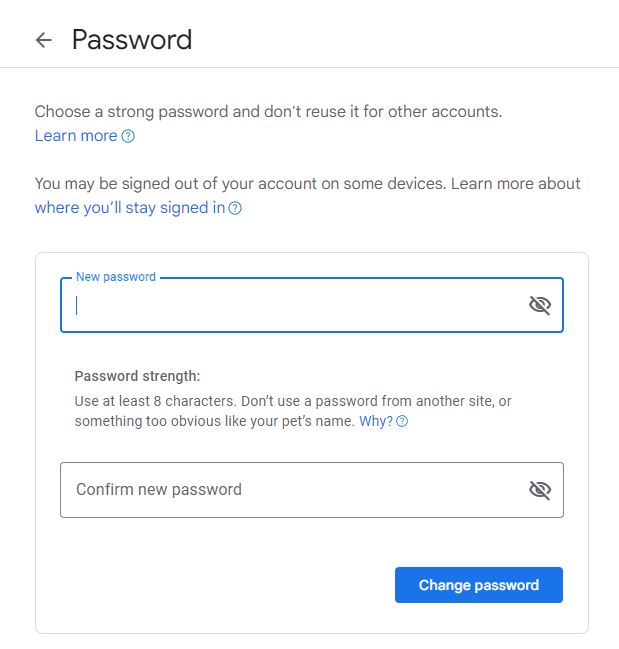
Aside from your Gmail password, changing the passwords of any related accounts may be a good idea. For example, if you use your Gmail account to log in to your bank account, update that password as well.
2. Enable Two-Factor Authentication
Once you control your Gmail account, it’s time to increase security to prevent it from happening again. Gmail offers two-factor authentication (2FA), like many cloud services, for better protection and safety.
You must enter a password and receive an email or SMS code to verify. The email gets sent to a different address, or you could use your phone number.
- Log into the Google Security page.
- Click on Signing in to Google and select 2-Step Verification.

- Select Get Started and follow the wizard.
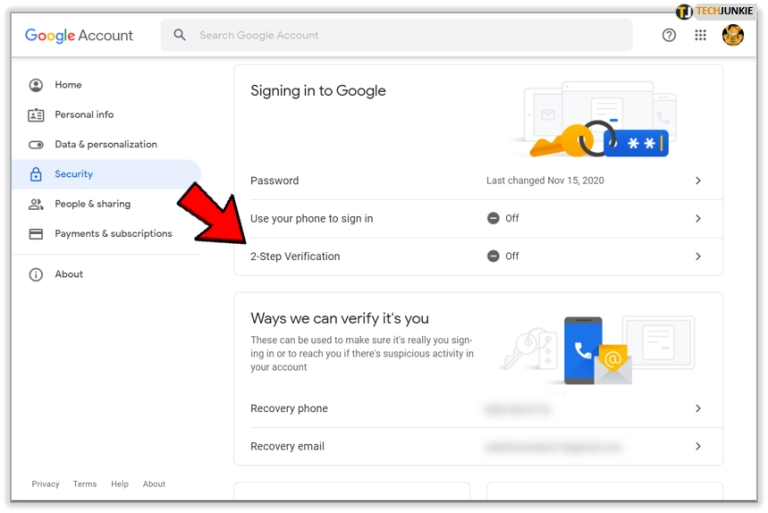
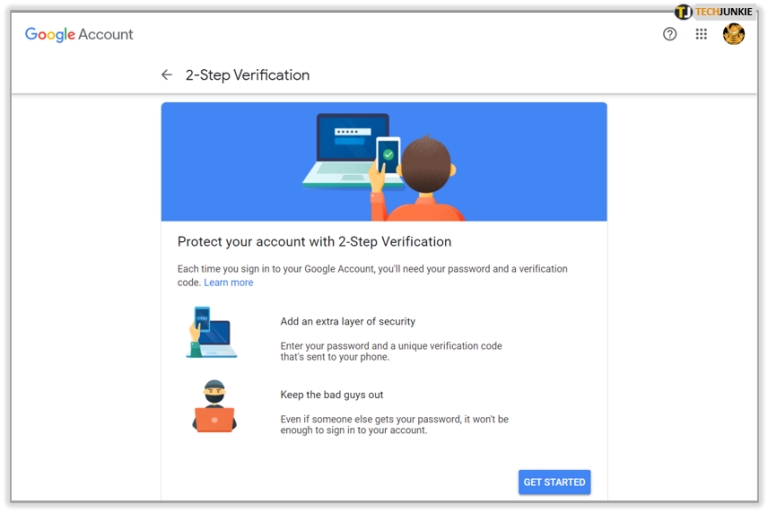
You can select an SMS or call, use a hardware security key, or enter your phone number. We suggest the SMS option. You can log into Gmail from anywhere, anytime, as long as you have your phone.
Ensure that you have a recovery email for any login alerts. If someone tries to reaccess your Gmail account, it should trigger a login email. It is a good idea to contact your local authorities if any of your banking or financial information has been compromised.
3. Run an Antivirus and Malware Scan
If someone does gain access to your Gmail account, you won’t necessarily know how they did it. They could have used brute force on the Gmail server or hacked your device. It’s too much of a risk not to check, so next, you should perform a full antivirus scan of all your devices.
Then, run a malware scan as a secondary measure.
4. Let Everyone Know
Now that your account is in your control again and further secured, it is a good time to let everyone know you lost control over your account. Tell them they can safely ignore and delete any suspicious-looking email sent from your account and that everything is fine now.
What to Do if You Can’t Sign-In to Your Gmail Account
If your account has been hacked, you may be unable to log in. Reach out to Google through the account recovery page to regain control of your account.
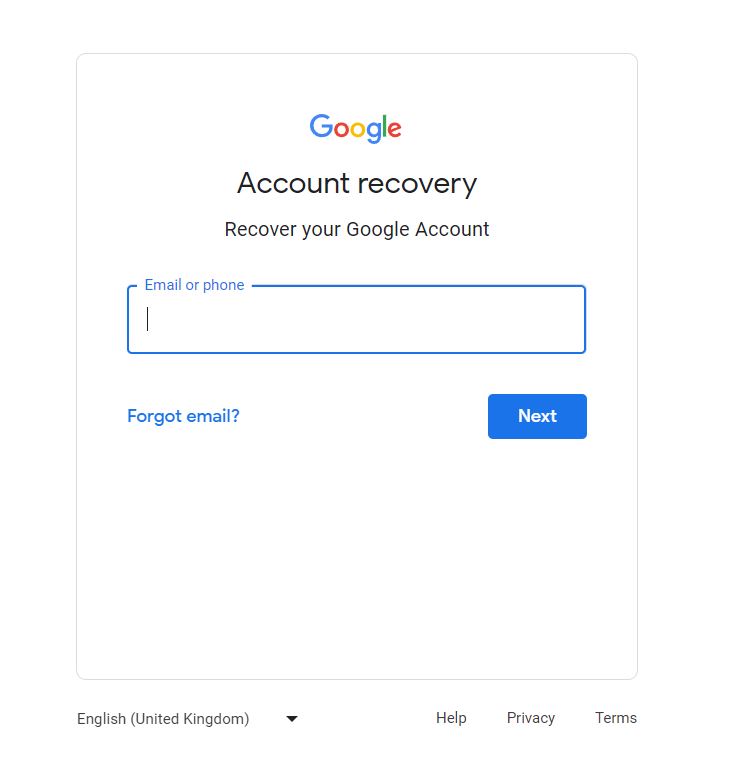
Once you’ve typed in your Gmail address (be sure it’s the right one for the account you’re trying to get back), it will ask you to enter the last password you remember. Follow the steps, including verifying the necessary information to regain access to your Gmail account.
You must add a recovery email and phone number when setting up your Gmail. Remember which month and year you set the account up is also a good idea. Google may ask when you initially set the account up as a security verification question.
Holes in Your Security You May Have Overlooked
Understanding what makes your Gmail account vulnerable is essential to improve its security. You may have 2FA, a password comprised of hieroglyphics, and the best antivirus software on the market, but it won’t do you any good if you’re unaware of other security risks.
Hackers can use various methods to access your account, including using a device that receives your 2FA codes, cloning your phone number, and accessing backup codes. The common theme among all these cases is that they can do so because you have not updated your account. It is important to regularly clear your backup codes and update your contact information to protect your account from these attacks, as hackers rely on outdated account information.
Now You Know!
If your Gmail account contains essential emails, you should use two-factor authentication and other security measures to ensure no one else can access it. Remember that your Gmail account also acts as a gateway to Google services, so you should not compromise its security.
With your Gmail account’s security sorted, check out how to send an email with a previous date.
FAQs
A: Even if hackers cannot access your email account, they can send spoofed messages using an outbound mail server and mailing software.
A: You can’t log out from all devices simultaneously, but you can click on each and select “Sign out.” So, if you are in doubt that someone else has logged into your account and that device is not yours, sign out from it.
How to Change the Time on Amazon Echo
Read Next















30 thoughts on “How To Check if Someone Else is Using Your Gmail Account”
I don’t want to overreact, but I also don’t want to be played.
For those who have experienced this before,
Ask me to try SEFTYHUB and I did
Now Im great full. Similar case should reach them out
SEFTYHUB @GMAIL COM
TELEGRAM @SEFTYHUB
SEFTYHUB @GMAIL COM
TELEGRAM@SEFTYHUB
Telegram @SEFTYHUB
One fateful morning while my wife was getting ready for work, a text came in on her phone and I saw “hey babe, can’t wait to see you on friday ”.she had my friend’s name saved as another name. Unfortunately, she wasn’t there atm but her phone was locked and I didn’t have access to her phone.
This made me really suspicious because she had told me earlier in the week she was going on a business trip so I knew immediately she was cheating on me . I remember going online immediately to search how to spy on a cheating spouse phone and I somehow landed on a forum where they recommended SEFTYHUB as a private investigator and how he can remotely access device.
In summary, I contacted SEFTYHUB and told him about my situation. Gave him some details about my wife and that was all he needed to gain remote access for me. After 4hours, he gave me access to her Whats*App message and Message/text messages as well. I read all their conversations and how they have even been mocking me in their chat. I printed all their chats for evidence.
Email
SEFTYHUB @GMAIL.COM
cheating spouse. Thanks to a friend who introduced me to a Professional
hacker who assisted me in obtaining all secret files that my husband had
been hiding for several years of our marriage. He assisted in hacking and
gaining access to my cheating husband’s iCloud, social media networks, call
log and spy call recording, monitoring SMS text messages remotely, cell
phone GPS location tracking, spying on What*sApp Messages, Gmail, and kik,
and I discovered he had done me dirty. The hacker is discrete and proactive
in his work very confidential i must say; you can reach him at email
SEFTYHUB @GMAIL. COM
SEFTYHUB is here to help you approach the situation with clarity, discretion, and a responsible plan.
How SEFTYHUB Can Help
1. Understand Your Concerns
We help you organize the behaviors and changes that have raised your concerns, distinguishing what you have actually observed from what you fear might be happening.
2. Explore Possible Explanations
Not every change in behavior indicates infidelity. SEFTYHUB helps you consider alternative explanations and avoid making decisions based solely on suspicion.
3. Plan a Calm Conversation
We can help you prepare the right questions, communicate your concerns clearly, and discuss relationship boundaries without unnecessary accusations or conflict.
4. Identify Your Next Steps
If your concerns remain unresolved, we can help you consider appropriate options, including setting boundaries, seeking relationship counselling, or deciding what you need to feel secure in your relationship.
5. Protect Your Peace of Mind
You deserve clarity without putting your emotional well-being at risk. Our approach emphasizes privacy, respectful communication, and informed decision-making.
Why Choose SEFTYHUB?
You don’t have to navigate relationship uncertainty alone. Our goal is to help you think clearly, understand your options, and hack through there devices remotely..
Reach out here
SEFTYHUB@GMAIL COM
TELEGRAM@SEFTYHUB
W/S + 1 9 297752133
If you’re dealing with a similar issue, it may be worth reaching out to her at msveronica023@gmail .com.
Are you being blackmailed by some low life?
Do you want to keep track of what your kids are doing?
Or do you just need to change a grade to save your gpa?
hackspytech0 team of Hackers offer a set of Professional hacking services. Hire a hacker for Facebook, Email, Web, Database or Phone hacking. They are a team of highly skilled and professional hackers that are able to hack any social accounts, email accounts, phone, website or database. 100% guarantee of privacy and confidentiality for our customers.
Mail: hackspytech0 @ gmail com
Thank you once again
I was also locked out of my account wrote countless times to them no response till I was recommended to Anthony who fixed mine, he works at meta reach him ( anthonydaviestech @ gmail com ) anhtony hes a genius
Below is his contact information
EMAIL VIA: Cleanspytech @ gmail .com
ADDRESS :1525 Newton St NW
Washington DC 20010
Below is the contact information
EMAIL VIA: Cleanspytech @ gmail .com
ADDRESS :1525 Newton St NW
Washington DC 20010
Hiring the professional service of cleanspytech was actually the best choice, she remotely got me access to my partner’s Iphone from a long distance without knowing. I can now access his phone anytime and anywhere, this really gives me rest of mind.
Below is the contact information
EMAIL VIA: Cleanspytech @ gmail .com
ADDRESS :1525 Newton St NW
Washington DC 20010